
Key takeaways
- Searching 868 keywords, 7 pages deep, gave us 197,022 unique Amazon UK products.
- Offer pages gave 394,727 seller-product links, and a wider 1,068-keyword pass read 55,660 seller profiles.
- We threw out misread 'Save X%' ratings and kept 14,923 products out of seller-country figures.
To scrape Amazon search results at scale, we ran 868 keywords through 7 result pages each on amazon.co.uk, kept 197,022 unique products, then followed them to their offer pages and to 55,660 seller profiles. This case study covers that snapshot, taken on 23 to 24 September 2026, including the parts that broke.
Three Stages and What Each Returned
The scrape was a chain. Search results gave us products, product offer pages gave us sellers, and seller pages gave us the business details behind each seller. Each stage fed the next one a list of IDs.
| Stage | What went in | What came out |
|---|---|---|
| Search pages | 868 keywords, pages 1 to 7 | 197,022 unique products |
| Offer pages | the products from the search stage | 196,376 products with offer data, 394,727 seller-product links |
| Seller profiles | sellers from a wider 1,068-keyword pass | 55,660 seller profiles, 51,374 with a feedback score |
| Offer export | one row per offer | 541,697 raw rows, trimmed to the latest fetch per product |
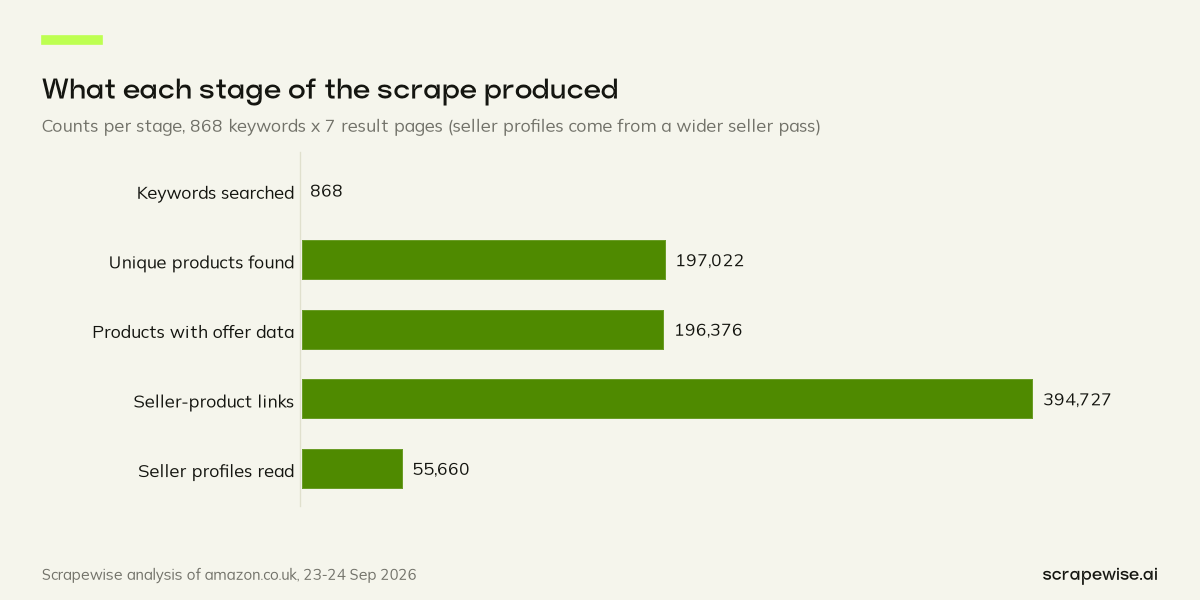
The counts shrink and grow in odd places. A keyword list becomes far more products than keywords, because every page holds dozens of listings. Products then fan out into seller links, because one product can have several sellers. Sellers fold back in again, because a large seller turns up on many products.
Stage One: Search Pages
We picked 868 everyday shopping keywords across 16 categories, from shampoo to turbo trainers, and asked for pages 1 to 7 of each search. Seven pages kept the job a predictable size and went deep enough to see how listings change further down a search.
Every results page came back as structured rows. For each product we kept the ASIN (Amazon's product ID), title, position on the page, price, star rating, review count, the sponsored flag, badges such as Amazon's Choice, coupon text and the "bought in past month" label. The ASIN mattered most. The same product often shows up in several searches, so we de-duplicated on it, and 197,022 unique products were left.
Not every product had every field. 193,782 had a price and 182,700 had a star rating. We kept the rows with gaps rather than guess the missing values, and every figure in the series names the base it uses.
Stage Two: Offer Pages
Each product has an offer page listing everyone who sells it. We read it for every product and got one row per offer: seller, price, shipping, condition, where it ships from, whether it was the featured offer, and the delivery estimate. 196,376 of the 197,022 products returned offer data.
Two things to know about this stage. First, we capture about 11 sellers per product at most, so a product with a crowd of sellers is undercounted. Our post on Amazon buy box competition carries that caveat next to every seller count. Second, the offer export also covers products found outside the 868-keyword set, which is why it is a separate base in our posts.
Stage Three: Seller Profiles
The seller IDs from the offer pages pointed to public seller profiles. For the seller stage we used a wider pass over 1,068 keywords, so the seller set is not a strict subset of the product set. That pass read 55,660 seller profiles, and 51,374 of them showed a feedback score.
Each profile gave us the store name, the about text, the positive feedback share, the number of ratings and the declared business details, including the address. We use these only as aggregates, such as the share of sellers by country. No names, addresses or contact details appear in any post. The country split is in our post on Amazon UK sellers by country.
What Broke
Here is what needed fixing or working around, and what we did about each one.
A Coupon Tile Posing as a Rating
Some search results show a coupon tile with "Save X%" in it. For a while, our parser read those tiles as star ratings. Discounts are popular, but not that popular. Once we spotted it, we excluded every rating taken from those tiles.
Placeholder Prices
A few listings carry prices that look like placeholders. The priciest product in the sample was a heavy-lift drone at £14,728.00, and two chocolate fountains sat at £11,999.99 and £11,111.99 with no reviews. In all, 173 priced products cost £1,000 or more and 37 cost under £1. We kept them in the data and used medians everywhere, so they could not drag a headline. The full list is in the most expensive items on Amazon UK.
Ads We Could Not See
We caught a sponsored flag on 3.2% of products. Some ad slots are marked in ways our parser did not recognise, so every sponsored figure is a minimum. The effect on prices is in our post on Amazon sponsored products price.
A Seller File With a Gap
One large account appeared on 14,923 products but was missing from the seller file. Rather than guess its country, we left those products out of every seller-country figure.
One Frozen Study Base
The analysis runs on a processed snapshot of the product pass, frozen before any post was written. The raw files from that pass were not kept. A later pull covered a wider keyword set, so it cannot stand in for the original pass, and every post in the series cites the frozen snapshot as its base.
Repeat Visits
The raw offer export held 541,697 rows, and some of them were repeat fetches of the same offer page. We kept only the latest successful fetch of each offer page.
What We Would Keep for the Next Scrape
If you plan your own run, start with these habits:
- Log the count at every stage. When a number jumps or drops, you want to see it the same day, not in the final report.
- Check parsed fields against a sane range. A star rating outside Amazon's scale points to a parser bug.
- De-duplicate on the product ID, never on the title. Identical titles can hide different pack sizes, as our same product, different price post shows.
- Treat Amazon's labels as minimums and keep outliers flagged, not deleted.
- Keep the raw files until the last chart is signed off.
The blocking side is its own topic. If your pages come back as check pages instead of results, read web scraping without getting blocked. If the prices load after the page does, see how to scrape JavaScript e-commerce websites. And for what 197,022 products say once the scraping is done, start with the Amazon UK marketplace statistics.
How We Collected This Data
Three Scrapewise scrapers did the collecting, in this order. First, the Amazon Search API turned every amazon.co.uk results page into rows with position, price, rating, review count, sponsored flag, badges, coupon text, title and the "bought in past month" label. Next, the Amazon Offers API returned a row per offer with seller, price, shipping, condition, ships-from, featured offer and delivery. Last, the Amazon Seller API returned store name, about text, feedback and business details, which we publish only as aggregates.
All three share one price, €0.00015 per call or €0.15 per 1,000 calls, and deliver their rows through the REST API or a CSV/Excel export. Create an account and point the same three scrapers at your own keyword list.
Planning a scrape of your own Amazon searches? Try the chain with 5 free requests, then pay per call as the job grows. Create your account or read pricing first.
Paste a marketplace URL — get structured market data
Size categories, track assortments, monitor trends. Clean feeds ready for your BI stack.
97% accuracy on Amazon benchmarks · no credit card · book a 15-min call →