
Custom scrapers for the sites with no data API
Our 36 data APIs cover Amazon, Walmart, Google and YouTube. Every other site runs on the AI scraper: you paste a URL, define the columns you want in a Custom Schema, and the AI fills them from the rendered page on your schedule. Idealo, eBay, Kaufland, MediaMarkt, Otto and Bol are written up below as worked examples.
Six worked examples
These are not a catalogue. They are six sites we have already written up in detail, because people asked for them first. Each page covers what the AI scraper gets, what it cannot get, why the site's own API does not answer the question, and what a month of daily runs costs. Any public website works the same way: you define the columns once in a Custom Schema and point the scraper at the URLs.
- Marketplace
Bol
Who holds the buy block on a bol listing, at what delivered price, and which other sellers sit underneath it.
bol.comRead the write-up → - Marketplace
eBay
Live listings, seller names and the sold and completed history that eBay's own API will not hand you. Daily schedule, REST, CSV or Excel.
ebay.comebay.co.ukebay.deebay.fr+3Read the write-up → - Price comparison
Idealo
Every merchant offer on one idealo product page, read after JavaScript and returned as columns you choose. Daily schedule, REST, CSV or Excel.
idealo.deidealo.atidealo.co.ukidealo.fr+2Read the write-up → - Marketplace
Kaufland.de
Every seller on a Kaufland offer, the winning price and who holds it, read after JavaScript and returned as columns you choose.
kaufland.dekaufland.atkaufland.czkaufland.sk+1Read the write-up → - Electronics retailer
MediaMarkt
Europe's largest electronics chain, read as columns you choose: price, the strikethrough above it, delivery, store pickup and the energy label.
mediamarkt.demediamarkt.atmediamarkt.esmediamarkt.nl+2Read the write-up → - Marketplace
Otto.de
Germany's second-largest online retailer, read as a marketplace: price, delivery, seller and variant, returned as columns you choose.
otto.deRead the write-up →
The six side by side
The pattern repeats, which is why the same approach carries to a site that is not on this list: each of these publishes an API that serves its own sellers, and none of them publishes one that answers what a competitor is charging.
| Site | Market | Their own API |
|---|---|---|
| Bol | Netherlands and Belgium | Retailer API for your own seller account only |
| eBay | Global, strongest in US, UK and DE | Public Browse API exists, but sold listings are not in it |
| Idealo | DACH and Western Europe | Merchant-facing only, no public read API |
| Kaufland.de | Germany, Austria, Czechia, Slovakia, Poland | Seller API only, nothing for reading competitors |
| MediaMarkt | Germany, Austria, Spain, Netherlands, Belgium, Poland | Nothing public for reading prices |
| Otto.de | Germany | Partner API for approved sellers only |
How a custom scraper gets built
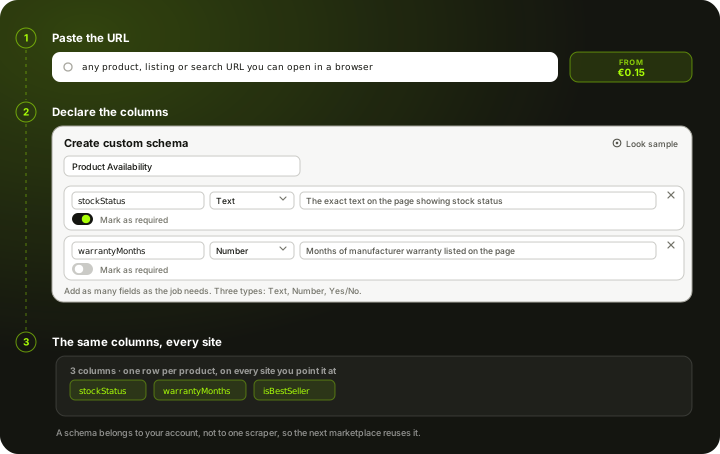
The same three steps for every site. Nothing is pre-built, which is exactly why it reaches pages a fixed integration never would.
- 1
Paste the URL
One product page, a category listing, or a whole list of links. The scraper works from the URL you hand it, so country domains and subpages need no separate integration.
- 2
You define the columns
Pick one of the ready schemas, Product Page, Product List or Page Menu, or build a Custom Schema with your own field names and types. Every run comes back with exactly those columns and nothing else. The AI fills them from the page after JavaScript has run, rather than from a saved CSS selector, so an ordinary redesign usually does not break the run.
- 3
Schedule it, then export
Run it once or daily. Every run is retrievable over REST with a stable column set, or downloadable as CSV or Excel, so downstream jobs never re-map fields.
Custom Schema: the columns are yours
Every scraper runs against a schema, and the schema is the column list. Schemas belong to your account rather than to one scraper, so the field set you settle on for a price comparison site can be reused on the next marketplace you point us at.
Start from a ready schema
- Product PageSingle product detail extraction
- Product ListMultiple products from a listing page
- Page MenuPage navigation data
- Custom SchemaDefine your own fields
Or write the fields yourself
Give the schema a name, then add a row per column: the field name, its type, a description telling the AI what to look for on the page, and whether the run should treat it as required. Three types only, so there is nothing to learn: Text, Number, Yes/No.
| Field name | Type | Description | Required |
|---|---|---|---|
| stockStatus | Text | The exact text on the page showing stock status (e.g. "In Stock", "Out of Stock", "Only 2 left"). | Yes |
| warrantyMonths | Number | Number of months of manufacturer warranty listed on the product page. | No |
| isBestSeller | Yes/No | Whether the product page shows a "Bestseller" badge or label. | No |
Four things worth knowing before you write one
The description is the instruction
It is not a comment for your colleagues. It is the sentence the AI reads to decide what on the page counts as that field. "Stock status" gets you guesswork. "The exact text on the page showing stock status, e.g. In Stock, Out of Stock, Only 2 left" gets you the string you wanted. Naming the wording you expect is the whole trick.
Required is a promise, not a filter
Marking a field required tells the run that a page without it is a problem rather than a normal result. Leave it off for anything a listing legitimately omits, like a warranty or a badge, and those cells simply come back empty instead of flagging the row.
Nothing you did not declare comes back
A saved schema is a closed contract: the run returns a list of products, each one carrying exactly your fields and no others. Two sites on the same schema produce the same columns in the same order, which is why one schema can serve every marketplace you point it at.
Saving publishes a version
Editing a schema does not rewrite history. Saving publishes a new version and every scraper on that schema picks it up on its next run, so you can widen a column list mid-project without rebuilding anything. Deleting archives the schema and scrapers already using it keep working unchanged.
What the builder will not let you do
- Every schema needs a name and at least one field.
- Field names are unique regardless of case, so price and Price cannot both exist.
- Sixteen names are reserved by the schema format itself and are rejected on save, among them type, properties, required, items, description, products, id, enum, default, format and title.
Custom scraper or data API?
Both land in the same portal, the same table and the same exports. The difference is who defines the schema and how you are charged.
Data API
- 36 ready endpoints for Amazon, Walmart, Google and YouTube
- Fixed columns we publish, with real sample rows on every page
- A published price per call, from EUR 0.15 per 1,000
- Nothing to configure: call it and rows come back
Custom scraper
- Any public website, including the ones nobody offers an endpoint for
- You choose the columns from what the page actually shows
- Charged per page from your wallet, at the tier the site needs
- Set up once in the portal, then scheduled daily
Point it at the site you actually care about
The six above are examples, not limits. Define your columns once in a Custom Schema, paste the URLs you want watched, and the same scraper runs against any public website on the same schedule.
Custom scrapers, answered
What people ask before pointing the scraper at a site we have not written up.
Any site we do not ship a dedicated data API for. Instead of calling a ready endpoint with fixed columns, you configure the AI scraper once against the URLs you care about, and from then on it behaves like your own endpoint: stable columns, REST retrieval, a daily schedule.