
Cdiscount Scraper
Cdiscount is the largest French-owned marketplace and the main alternative to Amazon in France, with thousands of third-party sellers competing on the same product. Its API is built for those sellers. The AI scraper reads the public listing instead, turns it into columns you define, and runs on a schedule.
- cdiscount.com
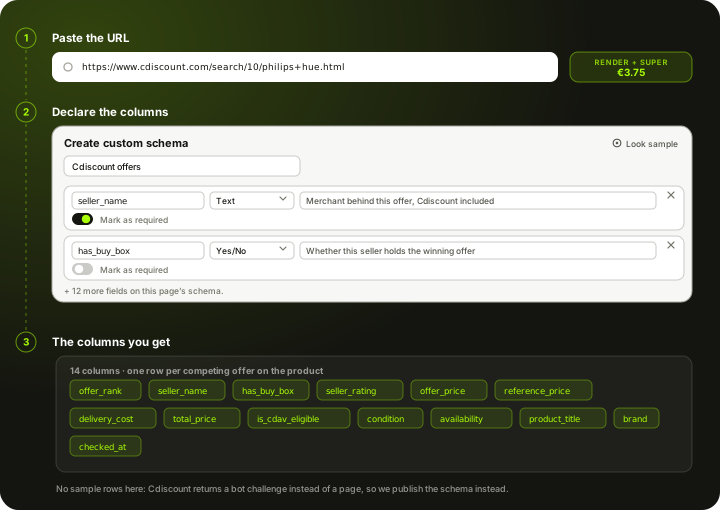
How to scrape Cdiscount
Cdiscount is the largest French-owned e-commerce site and the main domestic alternative to Amazon in France, and like Amazon it is two things at once: Cdiscount selling its own stock, and a marketplace of third-party sellers competing on the same product page. For a brand that matters, because your product can sit on cdiscount.com at Cdiscount's price, at an appointed reseller's price, and at a price set by someone you never appointed, with only the winning offer visible above the fold. Cdiscount's programmatic access is a marketplace seller API, scoped to the account you authorise and aimed at managing your own offers, orders and stock. There is nothing public for reading competitor prices, and Scrapewise carries no dedicated Cdiscount endpoint either. What works is the public listing. Access is the hard part: we measured it on 30 September 2026 and a plain fetch returned a 13.7 KB shell with no offers in it, while a real browser was met with an "Accès bloqué" page. A run therefore has to go through a rendered page from a residential exit. You paste cdiscount.com URLs into the AI scraper, declare the columns you want, and set a daily schedule. Every run comes back over REST, CSV or Excel, and you pay per page from a prepaid wallet.
What the AI scraper does with a cdiscount.com link
Three steps, same as any other site. Nothing about Cdiscount is pre-built, which is why it reaches a retailer nobody ships an endpoint for.
Paste the link
A product page, a brand page, or a category URL with the filters already applied. Cdiscount encodes filters and sort order in the address, so a view you built by hand in the browser is a valid input.
You declare the columns
A Cdiscount pricing job usually wants the winning offer price, any strikethrough reference price, delivery cost and window, who is selling, whether the offer is covered by the Cdiscount à volonté subscription, and the condition, since refurbished offers sit alongside new ones. You name those fields yourself in a Custom Schema, or start from the ready Product List schema and add to it.
Schedule it and take the data out
Run it once or daily. Pull each run by REST API or download it as CSV or Excel. The columns stay the same between runs, so a French table lines up with whatever you already collect from other European channels.
Set it up once. The data keeps coming.
Save your search once and it runs by itself. Every run lands in your own Scrapewise database, and you pick how to read it.
Set it up once
Add your ASINs, keywords, places or apps to a scraper in the web app. New accounts get 5 free requests.
Runs on your schedule
Pick daily, weekly on the days you choose, every few days, or the first or last day of the month. Scheduled runs start at night, European time. Need it more often? Start runs from your own code.
Saved in your database
Each run adds dated rows, so this week sits next to last week. Rows are kept for 90 days.
Use it your way
Open the table in the web app and download the latest run as an Excel file. Ask your own AI assistant about it. Or pull the rows into your code with an API key.
Ask your AI assistant about your own data
Connect Claude Desktop or Claude Code with a read-only key. The assistant reads the rows you've already collected, at no extra cost on Scrapewise. With a full-access key it can start a run for you too.
- Which of my ASINs lost the Buy Box this week?
- Which competitor cut prices the most since Monday?
- Show the keywords where I dropped out of the top 10.
What you send and what you get
You send a link and a column list. Who wins the offer, what delivery adds and whether the price is a promotion comes from the page itself.
- Link to a cdiscount.com product, brand or category pagerequired
Set your filters and sort order in the browser first, then copy the address. Cdiscount encodes them in the URL, so a view you built by hand is a valid input.
https://www.cdiscount.com/search/10/philips+hue.html - Your column listrequired
Start from the ready Product List schema or name your own fields in a Custom Schema. The AI fills the fields you declared.
Custom Schema, 14 fields - How often it runsoptional
- On demand
- Daily
- Weekly
- Monthly
Daily is the fastest cadence available, and enough to catch a seller who takes the winning offer off you overnight.
One row per competing offer on the product, 14 columns each
- offer_rank
- seller_name
- has_buy_box
- seller_rating
- offer_price
- reference_price
- delivery_cost
- total_price
- is_cdav_eligible
- condition
- availability
- product_title
- +2 more, see all columns
REST API, CSV or Excel. The column set stays the same between runs, so a Cdiscount table lines up with your other European channels.
The columns a cdiscount.com run gives you
We are not going to print a table of invented seller offers and call it real output. Cdiscount returns a shell to a plain fetch and an access-blocked page to an ordinary browser, so a run has to go through the residential tier. This is the column list you declare before the run, and the column list every run comes back with.
offer_rankPosition of the offer on the page, winning offer firstseller_nameMerchant behind this offer, Cdiscount itself includedhas_buy_boxWhether this seller currently holds the winning offerseller_ratingSeller rating, when Cdiscount displays oneoffer_priceHeadline price, before deliveryreference_priceStrikethrough or reference price, when showndelivery_costDelivery cost as the page states ittotal_priceOffer price plus deliveryis_cdav_eligibleWhether the offer is covered by the Cdiscount à volonté subscriptionconditionNew, used or refurbished, as the offer states itavailabilityStock wording the page publishes for the offerproduct_titleProduct title as Cdiscount writes itbrandBrand shown on the productchecked_atWhen this run collected the page (UTC)The columns are yours, not ours. Add, rename or drop any of them in a Custom Schema and every future run returns exactly your set.
What a cdiscount.com page costs
Pay-as-you-go from your wallet. No plan, no monthly fee, no seat count.
Measured on 30 September 2026, not assumed. A plain fetch of a cdiscount.com search URL came back at 200 but only 13.7 KB, and the body was not a shop at all: it was a bot-challenge payload naming its own verdict, with the request marked for a JavaScript challenge and the bot category left as unknown. There were no offers, no structured product data and not a single price token in it. Loading the same URL in a real browser returned a page titled "Accès bloqué". A browser alone is not enough here, so budget for a rendered page coming out of a residential exit.
200 cdiscount.com product pages checked once a day for a month is 6,000 pages.
about EUR 22.50 for the month at this tier
You are charged for the tier a run actually used, not the tier it was expected to need, and your balance never expires.
See the full price list →What this page is not promising
We would rather say this here than in a support ticket.
No dedicated Cdiscount endpoint
There is no Cdiscount data API in our catalogue and no pre-built Cdiscount schema. The AI scraper reads the page you point it at, and that is the whole mechanism.
This is the expensive tier
Cdiscount returns a shell to a plain fetch and blocks a plain browser, so every run goes through a rendered page from a residential exit at EUR 3.75 per 1,000 pages. If the page count matters to you, scope it before you switch it on rather than after.
No seller-account data
Anything behind Cdiscount's marketplace login, your offers, your orders, your performance figures, is not reachable by a scraper reading public pages.
The full seller list is extra URLs
A run against the base listing returns the winning offer. Covering every competing seller means covering the offers pages too, which changes the page count and the cost.
Daily, not real time
Daily is the fastest schedule. There is no real-time feed, no per-minute polling and no price-drop alerting.
No price history, no SKU matching
We store nothing about Cdiscount prices on our side, so a price curve starts the day you switch the scraper on. You get Cdiscount's rows as Cdiscount presents them, mapping them to your catalogue is a separate job, and we are not lawyers, so check Cdiscount's terms before you run anything.
Typical fields the AI scraper extracts from a cdiscount.com page
A starting point, not a fixed schema. What comes back is whatever the page actually shows on the day of the run.
Price and promotion
Cdiscount leans heavily on strikethrough pricing and named campaign events, so the headline number alone is a poor comparison.
- Winning offer price
- Strikethrough or reference price, when shown
- Discount percentage, when shown
- Promotion or campaign badge wording
- Instalment options advertised on the page
Who is selling it
The distinction that makes Cdiscount worth scraping separately from an ordinary retailer: Cdiscount and its marketplace sellers compete on the same product.
- Sold by Cdiscount or by a marketplace seller
- Seller name and rating, where a seller holds the offer
- Whether this seller holds the winning offer
- Cdiscount à volonté eligibility, which changes delivery for subscribers
- Availability and stock wording
Product and condition
Cdiscount runs a large refurbished business alongside new stock, and the two are easy to compare by mistake.
- Product title
- Brand
- Condition, including refurbished grades where stated
- Category breadcrumb
- Rating and review count
- Energy class, where the category requires it
- Product image URL
The column list is one you write: name each field, give it a type and a line telling the AI what to look for. The schema belongs to your account, so a Cdiscount field set can be reused on Fnac or on the next French channel you point us at. How Custom Schema works →
What it cannot give you The scraper cannot invent a field the page does not render. The full seller list for a product normally sits behind an offers link rather than on the main listing, so a run against the base URL returns the winning offer rather than every competing offer. Tell us up front if you need all of them, because that is a different set of URLs. Historical prices are not on the page and are not stored on our side.
What people use Cdiscount data for
Watching your brand on France's domestic marketplace
For a lot of brands Cdiscount is the second French channel after Amazon and the least monitored. Scraping your own products daily tells you what Cdiscount and its sellers actually charge for them, which is not always what you agreed.
Catching sellers you did not appoint
Cdiscount's marketplace side means a third party can be selling your SKU alongside Cdiscount's own offer. Capturing who holds the winning offer is what turns a suspicion into a channel conversation.
Campaign and discount tracking
Cdiscount runs frequent named campaigns with strikethrough pricing. Pulling current price, reference price and badge wording as separate columns shows the real discount depth over time, which is the number that erodes your positioning.
Competitor price monitoring in French retail
Scraping a category gives you what every competing product in it costs today, including delivery. Run it daily and you have a market curve rather than an impression.
Separating refurbished from new
Cdiscount's refurbished catalogue undercuts new stock on the same product. Capturing condition as its own column stops a refurbished price being read as a new-goods price war.
Feeding your own repricing rules
The export is a normal REST API or CSV, so it drops into whatever repricing logic you already run. Scrapewise supplies the observation; your rules decide what to do with it.
What makes cdiscount.com harder than an ordinary storefront
The bot wall is the first obstacle. The marketplace model and the refurbished catalogue are the ones that cost people time.
Access
- A plain fetch returns a bot-challenge payload rather than a page, so the cheapest tier is not an option
- The challenge names its own verdict: the request is marked for a JavaScript challenge before any content is served
- A real browser is met with an access-blocked page rather than the listing
- Runs have to go through a rendered page from a residential exit, which is the most expensive tier
- Success is high but not guaranteed on any individual run
Offers and sellers
- Cdiscount and its marketplace sellers compete on the same product at different prices
- Only the winning offer is visible above the fold; the rest sit behind an offers link
- Cdiscount à volonté eligibility changes the delivery a subscriber gets, which changes the real comparison
- Refurbished offers sit alongside new stock and are easy to read as the same product
Page structure
- Category pages are lazily loaded and paginated, so a category sweep is a list of URLs, not one request
- Reference and strikethrough prices appear and disappear with campaign events
- Product identity is inconsistent across marketplace offers, so titles vary for the same item
Scheduling and delivery
- Daily is the fastest cadence, which matches how often retail prices meaningfully move
- Every run is retrievable by REST API, or downloadable as CSV or Excel
- Columns stay stable between runs, so downstream jobs do not need to re-map fields
Cdiscount scraping — questions
What people ask before pointing the scraper at cdiscount.com.
No. Cdiscount's programmatic access is a marketplace seller API, scoped to the account you authorise and aimed at managing your own offers, orders and stock. It is not something you sign up for to read competitor prices, and there is no public read API for cdiscount.com product data.
Ready to pull Cdiscount data into your stack?
Start free — or talk to our team about your exact fields, refresh cadence and volume.