
MediaMarkt Scraper
MediaMarkt is the price every consumer electronics brand gets measured against in Europe, and it publishes nothing you can read programmatically. The AI scraper reads the public product page instead, turns it into columns you define, and runs on a schedule.
- mediamarkt.de
- mediamarkt.at
- mediamarkt.es
- mediamarkt.nl
- mediamarkt.be
- mediamarkt.pl
How to scrape MediaMarkt
MediaMarktSaturn is the largest consumer electronics retailer in Europe, which makes its shelf price the reference point for anyone selling a television, a laptop or a coffee machine on the continent. Unlike a marketplace, MediaMarkt is mostly selling its own stock, so the number on the page is not one seller's opinion, it is the price your product is being judged against. There is no public API that returns it. MediaMarkt offers marketplace access to its own third-party sellers and affiliate feeds to partners, and neither answers what a given SKU costs today in Germany versus Spain. Scrapewise does not carry a dedicated MediaMarkt endpoint either. What works is the product page. You paste MediaMarkt URLs into the AI scraper, declare the columns you want, and set a daily schedule. Every run comes back over REST, CSV or Excel, and you pay per page from a prepaid wallet.
What the AI scraper does with a MediaMarkt link
Three steps, same as any other site. Nothing about MediaMarkt is pre-built, which is why it reaches a retailer no data vendor ships an endpoint for.
Paste the link
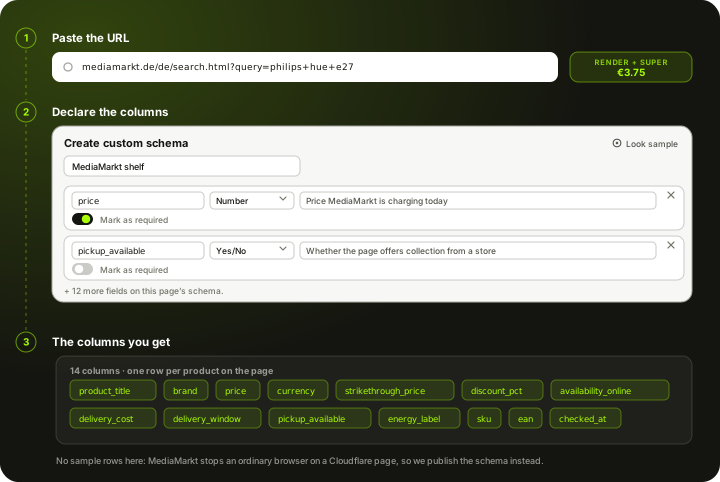
A product page, a category with your filters already applied, or a search URL. MediaMarkt runs a separate storefront per country and the scraper works from the URL you hand it, so a .de and an .es page are two inputs rather than two integrations.
You declare the columns
A MediaMarkt pricing job usually wants the current price, the strikethrough above it, whether the item ships or has to be collected, the delivery cost and the energy label. You name those fields yourself in a Custom Schema, or start from the ready Product Page schema and add to it. The AI fills your fields from the page after JavaScript has run rather than from a saved selector.
Schedule it and take the data out
Run it once or daily. Pull each run by REST API or download it as CSV or Excel. The columns stay the same between runs, so a MediaMarkt table and an Amazon table can share the same downstream pipeline.
Set it up once. The data keeps coming.
Save your search once and it runs by itself. Every run lands in your own Scrapewise database, and you pick how to read it.
Set it up once
Add your ASINs, keywords, places or apps to a scraper in the web app. New accounts get 5 free requests.
Runs on your schedule
Pick daily, weekly on the days you choose, every few days, or the first or last day of the month. Scheduled runs start at night, European time. Need it more often? Start runs from your own code.
Saved in your database
Each run adds dated rows, so this week sits next to last week. Rows are kept for 90 days.
Use it your way
Open the table in the web app and download the latest run as an Excel file. Ask your own AI assistant about it. Or pull the rows into your code with an API key.
Ask your AI assistant about your own data
Connect Claude Desktop or Claude Code with a read-only key. The assistant reads the rows you've already collected, at no extra cost on Scrapewise. With a full-access key it can start a run for you too.
- Which of my ASINs lost the Buy Box this week?
- Which competitor cut prices the most since Monday?
- Show the keywords where I dropped out of the top 10.
What you send and what you get
You send a link and a column list. The price, the discount, the delivery wording and the store availability all come from the page, so there is nothing else to configure.
- Link to a MediaMarkt product, category or search pagerequired
Set your filters in the browser first, then copy the address. Any MediaMarkt country storefront works the same way.
https://www.mediamarkt.de/de/search.html?query=philips%20hue%20e27 - Your column listrequired
Start from the ready Product Page schema or name your own fields in a Custom Schema. The AI fills the fields you declared.
Custom Schema, 14 fields - How often it runsoptional
- On demand
- Daily
- Weekly
- Monthly
Daily is the fastest cadence available. It is enough to catch a promotion starting and ending.
One row per product on the page, 14 columns each
- product_title
- brand
- price
- currency
- strikethrough_price
- discount_pct
- availability_online
- delivery_cost
- delivery_window
- pickup_available
- energy_label
- sku
- +2 more, see all columns
REST API, CSV or Excel. The column set stays the same between runs, so a MediaMarkt table and an Amazon table share one pipeline.
The columns a MediaMarkt run gives you
We are not going to print a table of invented prices and call it real output. MediaMarkt sits behind a challenge that an ordinary browser does not clear, so a run has to go through the residential tier. This is the column list you declare before the run, and the column list every run comes back with.
product_titleProduct title as MediaMarkt writes itbrandBrand shown on the productpriceHeadline price on the page todaycurrencyCurrency of the storefront you scrapedstrikethrough_priceReference price struck through above the offer, when showndiscount_pctDiscount the page advertises against that referenceavailability_onlineOnline stock wording, as the page states itdelivery_costDelivery cost as the page states itdelivery_windowDelivery estimate shown with the offerpickup_availableWhether the page offers collection from a storeenergy_labelEU energy class, on the categories that carry oneskuMediaMarkt article number, when printedeanEAN, only when the page prints itchecked_atWhen this run collected the page (UTC)The columns are yours, not ours. Add, rename or drop any of them in a Custom Schema and every future run returns exactly your set.
What a MediaMarkt page costs
Pay-as-you-go from your wallet. No plan, no monthly fee, no seat count.
Measured on 24 September 2026, not assumed. A plain fetch of a MediaMarkt search URL is refused, and loading the same URL in a real browser stopped on a Cloudflare interstitial rather than the results. A browser alone is not enough here, so budget for a rendered page coming out of a residential exit.
300 MediaMarkt product pages checked once a day for a month is 9,000 pages.
about EUR 33.75 for the month at this tier
You are charged for the tier a run actually used, not the tier it was expected to need, and your balance never expires.
See the full price list →What this page is not promising
We would rather say this here than in a support ticket.
No dedicated MediaMarkt endpoint
There is no MediaMarkt data API in our catalogue and no pre-built MediaMarkt schema. The AI scraper reads the page you point it at, and that is the whole mechanism.
No stock count for a named store
Branch-level availability sits behind a store picker and is not part of a normal run. Treat collection as a yes or no on the page, not as a shelf count in a particular city.
No guaranteed delivery
Automated traffic gets challenged. We escalate to higher tiers, but we cannot promise every MediaMarkt page returns data on every run.
Daily, not real time
Daily is the fastest schedule. There is no real-time feed, no per-minute polling and no price-drop alerting.
No price-history database
We store nothing about MediaMarkt prices on our side. A price curve is something you build by scheduling the scraper, starting from the day you switch it on.
No SKU matching included
You get MediaMarkt's rows as MediaMarkt presents them. Mapping them to your own catalogue is a separate job, and so is repricing. We are also not lawyers, so check MediaMarkt's terms before you run anything.
Typical fields the AI scraper extracts from a MediaMarkt page
A starting point, not a fixed schema. What comes back is whatever the page actually shows on the day of the run.
Price and promotion
MediaMarkt sells on campaigns. The headline number on its own tells you very little without the reference price sitting above it.
- Current price
- Strikethrough or reference price, when shown
- Advertised discount percentage
- Campaign or promotion wording on the tile
- Currency of the storefront
Availability and delivery
The part that separates a real competing offer from a listing nobody can buy today.
- Online stock wording
- Delivery cost and delivery window
- Whether collection from a store is offered
- Wording for items available to order only
- Bundle or service add-ons shown with the price
Product identity
What you match your own catalogue against. An electronics retailer prints more identifiers than a fashion one, but still not on every listing.
- Product title
- Brand
- MediaMarkt article number
- EAN, when the page prints it
- EU energy class, on the categories that carry one
- Rating and review count
The column list is one you write: name each field, give it a type and a line telling the AI what to look for. The schema belongs to your account, so a MediaMarkt field set can be pointed at Saturn or another retailer without rebuilding it. How Custom Schema works →
What it cannot give you The scraper cannot invent a field the page does not render. EANs and article numbers come back only when MediaMarkt prints them on the listing you scraped. Stock at a named branch is shown behind a store picker and is not part of a normal run, so treat pickup as a yes or no rather than a shelf count. Historical prices are not on the page and are not stored on our side, so a price curve has to be built by running the scraper on a schedule.
What people use MediaMarkt data for
Watching the price your brand is judged against
For a consumer electronics brand, the MediaMarkt shelf price is the number customers quote back at every other channel. Scraping it daily tells you what that number is before a retailer or a distributor tells you.
Catching a campaign the day it starts
MediaMarkt discounts in bursts. A daily run that records the price and the strikethrough above it shows you when a promotion opened, how deep it went and when it closed, which is the record nobody sends you afterwards.
Comparing the same SKU across countries
The same television is rarely the same price on the German, Spanish and Dutch storefronts. One table across those URLs exposes the gap, and the grey-market arbitrage that follows it.
MAP and channel policy enforcement
If you set a recommended price, a large retailer breaking it matters more than a small one. A dated row showing the price and the discount it advertised is the evidence that conversation needs.
Feeding your own repricing rules
The export is a normal REST API or CSV, so it drops into whatever repricing logic you already run. Scrapewise supplies the observation; your rules decide what to do with it.
Assortment and gap analysis
Scraping a category shows which models MediaMarkt actually stocks and at what depth. That is where a distribution gap or an ageing line shows up first.
What makes MediaMarkt harder than an ordinary storefront
The access problem is the same as Kaufland. The pricing problem is its own.
Access
- Plain HTTP requests are refused outright
- A Cloudflare interstitial stops an ordinary browser, so runs have to go out rendered through a residential exit
- Success is high but not guaranteed; a page that refuses on one run often comes back on the next
Price structure
- Campaign pricing means the headline number moves without the product changing
- A strikethrough reference price is shown on some listings and not others, so a discount column is often empty
- Bundles and service add-ons are priced alongside the product and are easy to read as the product price
Country sites
- mediamarkt.de, .at, .es, .nl, .be and .pl are separate storefronts with separate prices
- Saturn is the same group on a different brand, and its prices are not automatically the same
- Currency differs outside the eurozone and has to be normalised before you compare
Scheduling and delivery
- Daily is the fastest cadence, which matches how often a campaign price meaningfully moves
- Every run is retrievable by REST API, or downloadable as CSV or Excel
- Columns stay stable between runs, so downstream jobs do not need to re-map fields
MediaMarkt scraping — questions
What people ask before pointing the scraper at MediaMarkt.
Not one you can use for this. MediaMarkt offers marketplace access to its own third-party sellers and affiliate feeds to partners, both of which authenticate as a commercial relationship rather than answering what a SKU costs today. There is no public read API for prices, which is why competitor work on MediaMarkt comes off the public page.
Ready to pull MediaMarkt data into your stack?
Start free — or talk to our team about your exact fields, refresh cadence and volume.