
John Lewis Scraper
We do not have a dedicated John Lewis data API. What we do have is an AI scraper that reads a johnlewis.com page you point it at, turns it into the columns you asked for and hands them back by REST, CSV or Excel — on a schedule, priced per page.
- johnlewis.com
How to scrape John Lewis
John Lewis publishes no read API for its catalogue. There is no key to apply for and no endpoint to call, which is why the page is the interface. John Lewis built its position on price matching, which makes its price a composite of its competitors' rather than an independent one. The way to get the data is to read the page the way a customer sees it: point the AI scraper at a johnlewis.com URL, declare the columns you want in plain English, and schedule it. A broad-range retailer prices thousands of unrelated categories on different logics, so the useful scrape is narrow and deep rather than catalogue-wide.
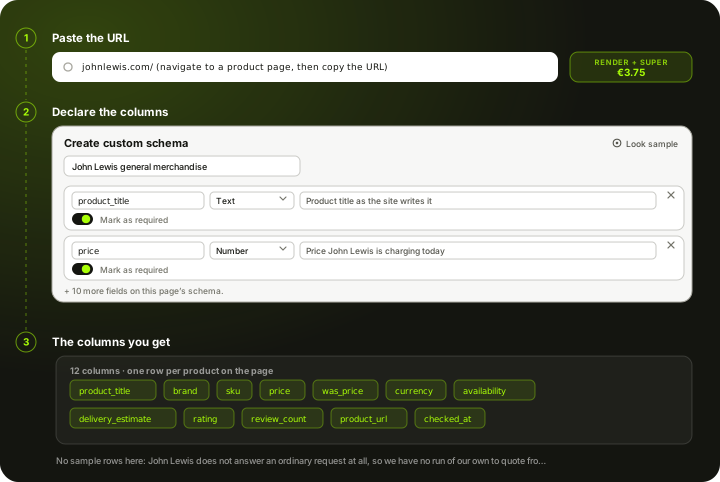
What the AI scraper does with a johnlewis.com link
The same three steps as any other page you point it at. Nothing about John Lewis is pre-built, which is exactly why it works on pages nobody wrote a connector for.
Paste the link
Give it a johnlewis.com product or listing URL. Market, currency and assortment all come from the page itself, so there is no region setting to get wrong — the URL decides.
Declare the columns
Name each field, give it a type and write a line telling the AI what to look for. “product_title” and “brand” are the two most people start with. The schema is yours and you can change it between runs.
Schedule it and collect
Run it hourly, daily or on demand. Every run returns the same columns in the same order with a timestamp on each row, so the history builds itself.
Set it up once. The data keeps coming.
Save your search once and it runs by itself. Every run lands in your own Scrapewise database, and you pick how to read it.
Set it up once
Add your ASINs, keywords, places or apps to a scraper in the web app. New accounts get 5 free requests.
Runs on your schedule
Pick daily, weekly on the days you choose, every few days, or the first or last day of the month. Scheduled runs start at night, European time. Need it more often? Start runs from your own code.
Saved in your database
Each run adds dated rows, so this week sits next to last week. Rows are kept for 90 days.
Use it your way
Open the table in the web app and download the latest run as an Excel file. Ask your own AI assistant about it. Or pull the rows into your code with an API key.
Ask your AI assistant about your own data
Connect Claude Desktop or Claude Code with a read-only key. The assistant reads the rows you've already collected, at no extra cost on Scrapewise. With a full-access key it can start a run for you too.
- Which of my ASINs lost the Buy Box this week?
- Which competitor cut prices the most since Monday?
- Show the keywords where I dropped out of the top 10.
What you send and what you get
You send a link and a column list. Everything else — market, currency, which products are on the page — comes from the page, so there is nothing to configure twice.
- Link to a John Lewis pagerequired
Open the product or category page in your browser and copy the address. Any John Lewis country domain works the same way.
https://www.johnlewis.com/ - Your column listrequired
Field name, type and one line of plain English per column. Written once, reused on every run.
product_title, brand, sku, price - How often it runsoptional
Hourly, daily, weekly or on demand through the API. Daily is what most price monitoring uses.
Daily at 06:00 UTC
One row per product on the page, 6 columns each
- product_title
- price
- currency
- availability
- brand
- source_url
REST API, CSV or Excel. The column set stays the same between runs, so downstream jobs do not re-map fields.
What a run on John Lewis actually returned
This is real output, not a mock-up. 4 rows, collected on 3 October 2026 from live johnlewis.com product pages through our own engine, the same way one of your runs would. Prices move, so treat the numbers as a sample of shape rather than a current price list.
All 6 columns
- product_title
- price
- currency
- availability
- brand
- source_url
product_titleproduct_titleProduct title as the retailer writes it | pricepricePrice the page is charging today | currencycurrencyCurrency the page quoted | availabilityavailabilityStock state the page published | brandbrandBrand as the retailer labels it | source_urlsource_urlThe exact page this row was read from |
|---|---|---|---|---|---|
| John Lewis Egyptian Cotton Towels | 6 | GBP | InStock | John Lewis | https://www.johnlewis.com/john-lewis-egyptian-cotton-towels/dark-steel/p4851977 |
| Longchamp Le Pliage Original Large Shoulder Bag | 125 | GBP | InStock | Longchamp | https://www.johnlewis.com/longchamp-le-pliage-original-large-shoulder-bag/mocha/p5051141 |
| Oura Ring 5 Health & Fitness Tracker Smart Ring | 399 | GBP | InStock | Oura | https://www.johnlewis.com/oura-ring-5-health-fitness-tracker-smart-ring/silver/p115358899 |
| John Lewis Velvet Pair Lined Pencil Pleat Curtains | 57 | GBP | InStock | John Lewis | https://www.johnlewis.com/john-lewis-velvet-pair-lined-pencil-pleat-curtains/champagne/p4899400 |
Column names are ones we chose when declaring the schema for this run. Yours can be named whatever your downstream job already expects. We pointed the run at 14 John Lewis product pages and 4 came back with a readable price. The rest returned something other than a product page, which is ordinary on this storefront and the reason the tier named above is what it is. We publish what we measured, not what we expect. Columns not shown here — sku — are ones these pages did not publish. An empty cell would have been the honest answer on every row, so we left them out rather than pad the table.
What a John Lewis page costs
Pay-as-you-go from your wallet. No plan, no monthly fee, no seat count.
Measured on 3 October 2026, not assumed. John Lewis did not answer a plain request at all — the connection is dropped rather than refused, which is the most restrictive case and the one that needs the full stack.
500 John Lewis pages checked once a day for a month is 15,000 pages.
about EUR 56.25 for the month
You are charged for what a run actually used, not what it was expected to need, and your balance never expires.
See the full price list →What this page is not promising
We would rather say this here than in a support ticket.
No dedicated John Lewis endpoint
There is no John Lewis API in our catalogue and no pre-built John Lewis schema. The AI scraper reads the page you point it at — that is the whole mechanism, and it is why it works on pages nobody built a connector for.
Nothing behind a login
It reads what a visitor can see. Account pricing, contract pricing and anything behind a sign-in are out of scope.
No field the page does not show
If the page does not print it, the scraper cannot return it. Identifiers like EAN or GTIN only come back where the retailer publishes them.
A price is a point in time
Every row carries the timestamp of the run that collected it. A price without one is not evidence, which is why the column is in the default schema.
John Lewis has one specific trap
Product pages carry a guarantee period that changes the effective value without changing the price.
Not a bulk dump of the catalogue
You give it the URLs you care about. It does not crawl johnlewis.com end to end, and a schedule that tried to would cost more than the answer is worth.
Typical fields the AI scraper extracts from a John Lewis page
Treat this as a starting point rather than a fixed schema. What comes back is whatever the page actually shows on the day of the run.
Price and promotion
On a broad-range retailer the promotion mechanic varies by category, so capture the wording rather than trying to parse it into a number.
- Current price
- Strike-through or was-price where shown
- Promotion or voucher wording as printed
- Multibuy conditions, where stated
- Currency and market the price belongs to
Stock and fulfilment
A cheaper competitor who cannot deliver this week is not a cheaper competitor.
- Stock state as the page states it
- Delivery window shown
- Click-and-collect availability, where exposed
- Delivery charge, where quoted
- Seller or fulfiller, where the page names one
Product identity
Broad catalogues mix branded and own-label lines, so the retailer's own code is the one field always present.
- Site's own article number
- EAN or GTIN, where published
- Brand, or own-label name
- Category breadcrumb
- Rating and review count
- Product image URLs
The column list is one you write: name each field, give it a type and a line telling the AI what to look for. The schema belongs to your run, not to us. How Custom Schema works →
What it cannot give you If a field is not visible on the page, the scraper cannot invent it. Identifiers such as EAN or GTIN only come back when John Lewis publishes them.
What people use John Lewis data for
Daily competitor price tracking
A list of product URLs, a daily schedule, and a table you can diff against yesterday rather than a tab somebody checks by hand.
Own-label versus brand price gap
The gap between a retailer's own label and the branded equivalent on the same shelf, measured rather than estimated.
Promotion calendar reconstruction
Which lines go on promotion, when, and how deep. Public information that is only visible if you collected it.
Availability and delisting alerts
Whether your lines are listed, in stock and findable. Suppliers usually discover delisting late.
Price-index reporting
A fixed basket of lines read daily is a price index you own, rather than one you buy with a lag.
Feeding your own pricing rules
The export is a normal REST API or CSV, so it drops into whatever pricing logic you already run.
What makes John Lewis harder than an ordinary storefront
Here is what the scraper is actually up against on johnlewis.com, measured rather than assumed.
Access
- Plain HTTP requests are dropped rather than answered, so there is nothing to parse
- No named protection vendor on the response, which is why this one lands on a cheaper tier than most of the cohort
- robots.txt publishes sitemaps, which is the cheapest way to build the URL list a run works through
Breadth is the difficulty
- Different categories use different promotion mechanics, so one parsing rule does not fit the catalogue
- Own-label lines carry no manufacturer identifier, so cross-retailer matching needs titles or your own mapping
- Catalogues run to hundreds of thousands of lines, so scope the page count deliberately rather than sweeping
- Category pages are paginated and lazily loaded, so a sweep is a list of URLs rather than one request
What the page publishes
- No product-level structured data is published, so every field is read off the rendered page
- Product pages carry a guarantee period that changes the effective value without changing the price.
- Price is one of the last things the page settles on, so a read taken too early records the placeholder rather than the number
Keeping a history
- A single read is a snapshot; the value is in the series, which means the run has to be scheduled and the rows kept
- Every row carries the timestamp of the run that produced it, so two days can be compared without guesswork
- Columns stay stable between runs, so a dashboard written once does not break when the site redesigns
John Lewis scraping — questions
What people ask before pointing the scraper at johnlewis.com.
John Lewis publishes no read API for its catalogue. There is no key to apply for and no endpoint to call, which is why the page is the interface.
Ready to pull John Lewis data into your stack?
Start free — or talk to our team about your exact fields, refresh cadence and volume.