
Coolblue Scraper
Coolblue competes on a delivery promise as much as on price, and it sets both itself. There is nothing public to read them with. The AI scraper reads the page instead, turns it into columns you define, and runs on a schedule. Product and search pages both answer a plain fetch, which makes this one of the cheapest sites here to watch daily.
- coolblue.nl
- coolblue.be
- coolblue.de
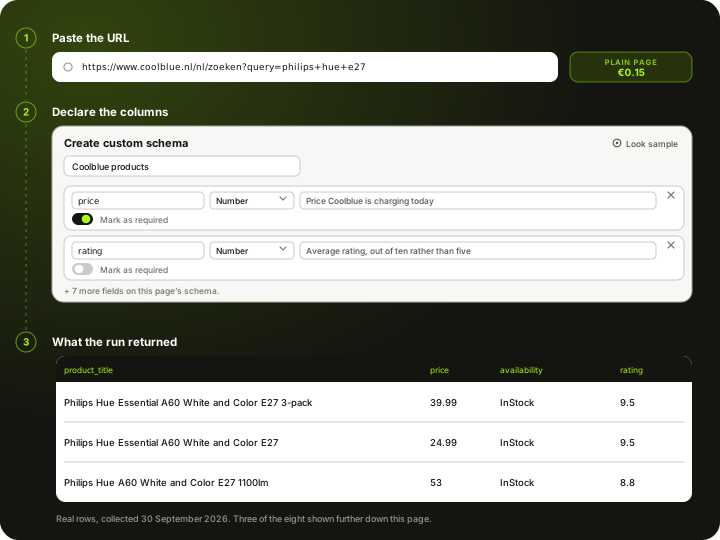
How to scrape Coolblue
Coolblue is the electronics retailer that made a delivery promise into a brand, and it is a retailer rather than a marketplace: one price per product, set by Coolblue, with no buy box and no seller competition to untangle. In the Netherlands and Belgium that price is a reference the rest of the market watches. Coolblue publishes nothing public for reading prices programmatically, and Scrapewise carries no dedicated Coolblue endpoint either. What works is the public page, and here Coolblue is unusually cooperative. We measured it on 30 September 2026: a plain fetch of a product URL came back at 200 with 1.4 MB of page carrying structured pricing, a brand and a rating, and a plain fetch of a search URL came back with a structured list of 24 products, each with its price, currency and stock state. Both sit on the cheapest tier, which is unusual for a site this size and makes Coolblue one of the cheapest sources on this list to watch daily. The catch is narrower than a bot wall: the delivery promise and the pickup option are built in the browser, so those two columns need a rendered page even though the price does not. You paste coolblue.nl URLs into the AI scraper, declare the columns you want, and set a daily schedule. Every run comes back over REST, CSV or Excel, and you pay per page from a prepaid wallet.
What the AI scraper does with a coolblue.nl link
Three steps, same as any other site. Nothing about Coolblue is pre-built, which is why it reaches a retailer nobody ships an endpoint for.
Paste the link
Product URLs and search URLs both answer a plain fetch here, and both carry structured pricing, so either is a valid and cheap starting point. One caveat we measured: the English path ignored our search query and returned a generic product list, while the Dutch path applied it correctly. Copy a URL that you have watched return the right results in a browser.
You declare the columns
A Coolblue pricing job usually wants the current price, the stock wording, the brand, and the rating and review count Coolblue leans on so heavily, all of which come back on the cheap tier. If you also want the delivery promise and the pickup option, declare them too, but know that those two are built in the browser and so pull the run onto a rendered page. You name the fields yourself in a Custom Schema, or start from the ready Product List schema and add to it.
Schedule it and take the data out
Run it once or daily. Pull each run by REST API or download it as CSV or Excel. The columns stay the same between runs, so a Dutch table lines up with whatever you already collect from bol and your other Benelux channels.
Set it up once. The data keeps coming.
Save your search once and it runs by itself. Every run lands in your own Scrapewise database, and you pick how to read it.
Set it up once
Add your ASINs, keywords, places or apps to a scraper in the web app. New accounts get 5 free requests.
Runs on your schedule
Pick daily, weekly on the days you choose, every few days, or the first or last day of the month. Scheduled runs start at night, European time. Need it more often? Start runs from your own code.
Saved in your database
Each run adds dated rows, so this week sits next to last week. Rows are kept for 90 days.
Use it your way
Open the table in the web app and download the latest run as an Excel file. Ask your own AI assistant about it. Or pull the rows into your code with an API key.
Ask your AI assistant about your own data
Connect Claude Desktop or Claude Code with a read-only key. The assistant reads the rows you've already collected, at no extra cost on Scrapewise. With a full-access key it can start a run for you too.
- Which of my ASINs lost the Buy Box this week?
- Which competitor cut prices the most since Monday?
- Show the keywords where I dropped out of the top 10.
What you send and what you get
You send a link and a column list. The price, the stock state, the brand and the rating come from the page itself.
- Link to a coolblue.nl product or category pagerequired
Product and search URLs both come back on a plain fetch with structured pricing in them. Use the market path rather than the English one: we measured the English search path ignoring the query and returning a generic list. Copy the address out of the browser once you have the view you want.
https://www.coolblue.nl/nl/zoeken?query=philips+hue+e27 - Your column listrequired
Start from the ready Product List schema or name your own fields in a Custom Schema. The AI fills the fields you declared.
Custom Schema, 9 fields - How often it runsoptional
- On demand
- Daily
- Weekly
- Monthly
Daily is the fastest cadence available, and cheap enough here that there is no reason to run it less often.
One row per product page, or one row per product in a search listing, 9 columns each
- product_title
- brand
- price
- currency
- availability
- rating
- review_count
- product_id
- checked_at
REST API, CSV or Excel. The column set stays the same between runs, so a Coolblue table lines up with your other Benelux channels.
What a coolblue.nl run actually returns
Real output, not an illustration. These eight rows came from a plain fetch of eight coolblue.nl product pages on 30 September 2026, discovered from a single search URL on the same tier. Two things in this table are worth knowing before you build on it, and both are called out in the notes below: Coolblue rates products out of ten rather than five, and it shares one review score across the pack-size variants of the same product.
All 9 columns
- product_title
- brand
- price
- currency
- availability
- rating
- review_count
- product_id
- checked_at
product_titleproduct_titleProduct title as Coolblue writes it | brandbrandBrand as Coolblue labels it | pricepricePrice Coolblue is charging today | currencycurrencyCurrency for this country site | availabilityavailabilityStock state as Coolblue publishes it | ratingratingAverage rating, out of ten rather than five, and shared across the pack-size variants of a product: the single bulb and the three-pack above both carry 9.5 | review_countreview_countNumber of reviews behind that rating, and shared across variants for the same reason | product_idproduct_idCoolblue's own product identifier, the same number that appears in the URL | checked_atchecked_atWhen this run collected the page (UTC) |
|---|---|---|---|---|---|---|---|---|
| Philips Hue Essential A60 White and Color E27 3-pack | Philips Hue | 39.99 | EUR | InStock | 9.5 | 34 | 968161 | 2026-09-30T00:00:00Z |
| Philips Hue Essential A60 White and Color E27 | Philips Hue | 24.99 | EUR | InStock | 9.5 | 34 | 968159 | 2026-09-30T00:00:00Z |
| Philips Hue A60 White and Color E27 1100lm | Philips Hue | 53 | EUR | InStock | 8.8 | 40 | 968152 | 2026-09-30T00:00:00Z |
| Philips Hue Filamentlamp White Ambiance Standaard E27 | Philips Hue | 30.99 | EUR | InStock | 9.3 | 156 | 890011 | 2026-09-30T00:00:00Z |
| Philips Hue Lightguide Globe White and Color E27 | Philips Hue | 70 | EUR | InStock | 9.2 | 10 | 950781 | 2026-09-30T00:00:00Z |
| Philips Hue Filamentlamp White Ambiance Standaard E27 2-pack | Philips Hue | 54 | EUR | InStock | 9.3 | 156 | 894206 | 2026-09-30T00:00:00Z |
| Philips Hue Filamentlamp White Globe G93 E27 - 2023 | Philips Hue | 32.99 | EUR | InStock | 9.3 | 159 | 925556 | 2026-09-30T00:00:00Z |
| Philips Hue A60 White E27 1100lm 2-pack | Philips Hue | 32.99 | EUR | InStock | 9.6 | 3 | 968146 | 2026-09-30T00:00:00Z |
What a coolblue.nl page costs
Pay-as-you-go from your wallet. No plan, no monthly fee, no seat count.
We measured this rather than assumed it, and Coolblue came back cheaper than we expected for a retailer this size. On 30 September 2026 a plain fetch of a coolblue.nl product URL returned 200 with 1.4 MB of page carrying a structured price, currency, stock state, brand and rating, and a plain fetch of a search URL returned a structured list of 24 products with the same pricing detail on each. No browser was needed for either, so both the discovery step and the reading step sit on the cheapest tier. The eight rows further up this page were collected that way. The one part that is not free of a browser is the delivery promise and the pickup option, which are filled in client-side, so a column list that includes them pulls the run onto the render tier at EUR 0.75 per 1,000. Decide whether you are buying the price or the whole offer, because that choice is what sets your bill here.
300 coolblue.nl product pages checked once a day for a month is 9,000 pages.
about EUR 1.35 for the month at this tier
You are charged for the tier a run actually used, not the tier it was expected to need, and your balance never expires.
See the full price list →What this page is not promising
We would rather say this here than in a support ticket.
No dedicated Coolblue endpoint
There is no Coolblue data API in our catalogue and no pre-built Coolblue schema. The AI scraper reads the page you point it at, and that is the whole mechanism.
The delivery promise is the expensive column
Price, stock, brand and rating come back on the cheapest tier from both product and search pages. The delivery promise and the pickup option are built in the browser, so a column list containing them runs on the render tier at EUR 0.75 per 1,000 instead of EUR 0.15. This is a choice about your column list, not a wall in front of the site.
Ratings are shared across variants
Coolblue rates out of ten, not five, and it attaches one review score to a whole product family: in the sample above the single bulb and the three-pack both show 9.5 from 34 reviews. Treat review_count as a family-level signal, not per-SKU evidence.
Three markets are three scrapers
coolblue.nl, coolblue.be and coolblue.de are separate sites with different assortments and pricing. We do not merge them for you.
Daily, not real time
Daily is the fastest schedule. There is no real-time feed, no per-minute polling and no price-drop alerting, and the delivery promise in particular changes within the day rather than between days.
No price history, no SKU matching
We store nothing about Coolblue prices on our side, so a price curve starts the day you switch the scraper on. You get Coolblue's rows as Coolblue presents them, mapping them to your catalogue is a separate job, and we are not lawyers, so check Coolblue's terms before you run anything.
Typical fields the AI scraper extracts from a coolblue.nl page
A starting point, not a fixed schema. What comes back is whatever the page actually shows on the day of the run.
Price and discount
Coolblue is a retailer, so there is one price rather than a list of competing offers. What matters is how far it has moved and from what.
- Current selling price
- Before-discount price, when the page shows one
- Discount percentage, when shown
- Promotion or bundle wording
- Instalment or lease options advertised on the page
The delivery clock
The field that makes Coolblue worth scraping as more than a price: the promise beside the price is half the offer. It is also the one part of the page a plain fetch does not give you, because it is built in the browser, so asking for it changes the tier a run uses.
- Delivery promise as advertised, cut-off time included
- Promised delivery date
- Delivery cost, where the page states it
- Pickup availability at a Coolblue store
- Stock wording for the product
Product and social proof
Coolblue puts unusual weight on ratings and written advice, which makes those fields a competitive signal rather than decoration.
- Product title
- Brand
- Coolblue product identifier from the URL
- Category breadcrumb
- Specification table values, where the page prints one
- Rating and review count
- Energy class, where the category requires it
- Product image URL
The column list is one you write: name each field, give it a type and a line telling the AI what to look for. The schema belongs to your account, so a Coolblue field set can be reused on coolblue.be and coolblue.de, or on the next Benelux channel you point us at. How Custom Schema works →
What it cannot give you The scraper cannot invent a field the page does not render. Price, stock, brand, rating and review count come back on a plain fetch of either a product or a search page. The delivery promise and the pickup option do not: we found only the untranslated interface templates in the plain HTML, which means those values are filled in by the browser, so a run that asks for them needs a rendered page. The delivery promise is also time-sensitive by design, so a run at 09:00 and a run at 23:00 can legitimately disagree, and the timestamp column is what makes that readable rather than confusing. Historical prices are not on the page and are not stored on our side.
What people use Coolblue data for
Watching a Benelux reference price cheaply
Both product pages and search pages answer a plain fetch, so watching a few hundred Coolblue products daily costs a couple of euro a month, and you do not have to bring the URL list yourself. There is no good reason to be guessing about this market.
Comparing the offer, not just the price
Coolblue competes on its delivery clock. Capturing the promise beside the price is the only way to see whether you are actually more expensive or just slower, which is a different problem with a different fix.
Brand and RRP monitoring
If you supply Coolblue, this is how you see what your products are actually listed at, with a timestamp. That is the evidence a commercial conversation needs.
Competitor price monitoring in Dutch retail
Scraping your competitive set daily gives you the price curve rather than an impression, and pairs naturally with bol on the marketplace side.
Cross-market checks between NL and BE
The same product is frequently priced differently on coolblue.nl and coolblue.be. One schema across both domains turns that into a table instead of an anecdote.
Feeding your own repricing rules
The export is a normal REST API or CSV, so it drops into whatever repricing logic you already run. Scrapewise supplies the observation; your rules decide what to do with it.
What makes coolblue.nl harder than an ordinary storefront
Access is genuinely easy here. The traps are in the data, not the door.
Access
- A plain fetch of a product page returns the full page with a structured price, brand and rating in it
- A plain fetch of a search page also returns a structured list of products with prices, so discovery is cheap too
- The delivery promise and the pickup option are built in the browser, so those columns need a rendered page
- The English search path ignored our query and returned a generic list, while the market path applied it correctly
- Success is high but not guaranteed on any individual run
Retailer, not marketplace
- One price per product, no buy box and no seller competition to untangle
- That makes Coolblue a clean reference price and a simple table to reason about
- Bundles and accessory packs are listed as their own products and are easy to compare by mistake
- Ratings are shared across pack-size variants, so a review count is not evidence about one SKU
A promise that moves during the day
- The delivery promise is tied to a cut-off time, so it legitimately differs between a morning and an evening run
- coolblue.nl, coolblue.be and coolblue.de are separate sites with different assortments and need separate scrapers
- Belgian and Dutch pricing for the same product is frequently not identical
Scheduling and delivery
- Daily is the fastest cadence, and on the plain tier it costs almost nothing to run it that way
- Every run is retrievable by REST API, or downloadable as CSV or Excel
- Columns stay stable between runs, so downstream jobs do not need to re-map fields
Coolblue scraping — questions
What people ask before pointing the scraper at coolblue.nl.
Not one you can use for this. Coolblue publishes nothing public for reading product or price data programmatically, and there is no Coolblue endpoint in our catalogue either. Reading the public product page is the mechanism.
Ready to pull Coolblue data into your stack?
Start free — or talk to our team about your exact fields, refresh cadence and volume.