
Your scraper logs a 100% success rate. Your dashboard is green. Your price table is empty, or worse, quietly wrong.
This is the most expensive failure mode in production scraping, and it is not caused by a block. It is caused by trusting the wrong signal. A status code tells you the server answered. It tells you nothing about whether it answered with the page you asked for.
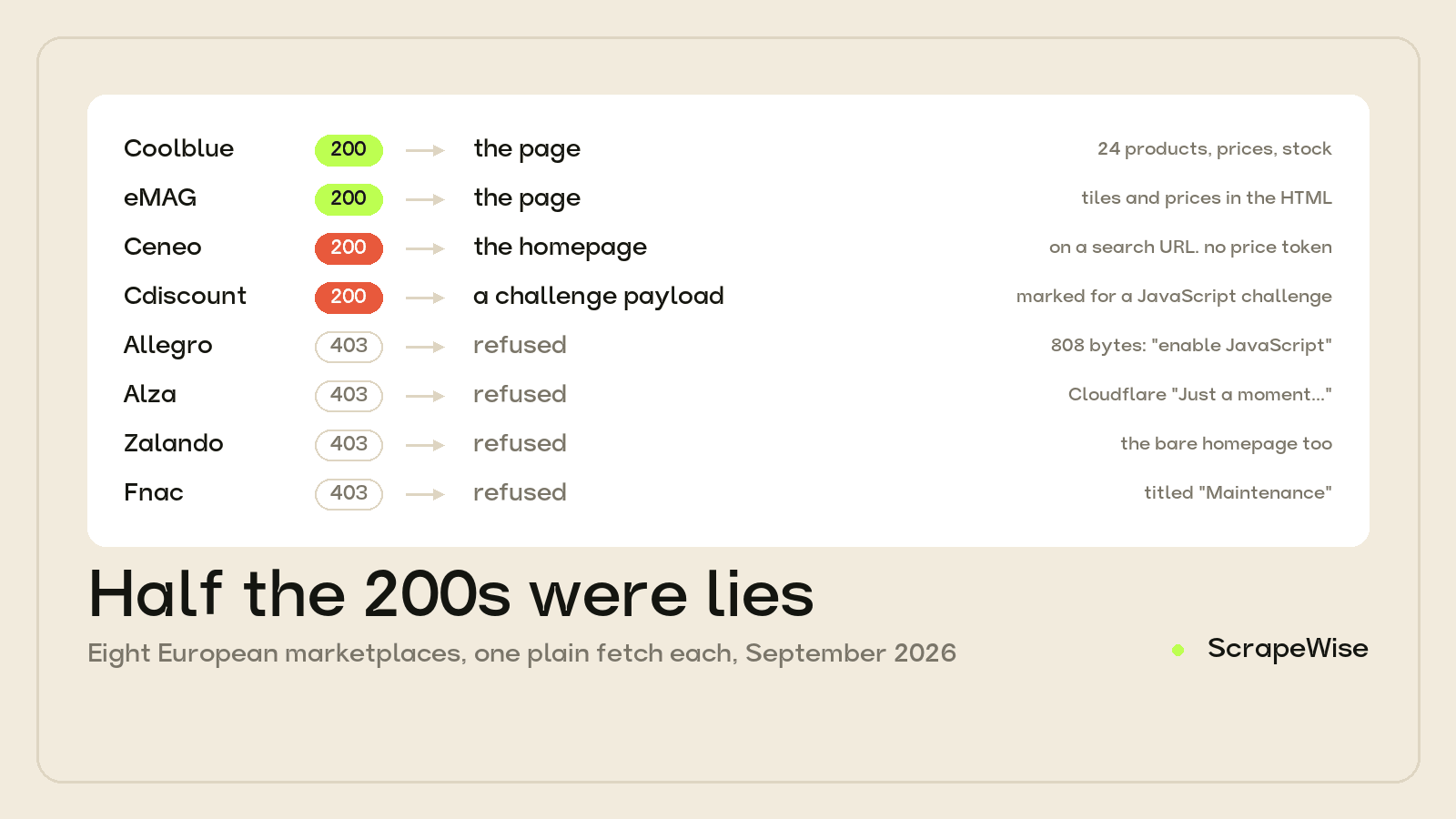
In late September 2026 we fetched eight European marketplaces and retailers with a single plain HTTP request each — no browser, no proxy, just a realistic User-Agent — and read every byte that came back. Four of the eight answered 200 OK. Only two of those four actually handed over the page.
Quick answer: never gate a scrape on the HTTP status code. Half the 200 responses we measured were empty shells: one served the homepage in response to a search URL, another served a bot-challenge payload that named its own verdict in the body. Gate on content assertions instead — assert a currency token, a structured-data node, or a minimum count of product blocks, and treat a failed assertion as a failed request regardless of status. The four sites that returned 403 were the honest ones. Full measurements in the table below.
Why an HTTP Status Code Cannot Tell You If a Scrape Worked
A status code describes the fate of the HTTP transaction, not the usefulness of the payload. Those are different questions, and modern bot management has every incentive to decouple them.
Returning 403 to a scraper is informative. It confirms detection, tells the operator exactly which request shape got caught, and invites iteration. Returning 200 with a stripped body is strictly better defence: the crawler records a success, moves on, and nobody investigates for weeks. The cost of the block lands on the scraper's data quality rather than its error log.
So the sites that are hardest to scrape are frequently the ones that never show you an error at all. If you only ever assert response.status == 200, you have built a monitor that is blind to the most sophisticated half of your targets.
What We Measured: 8 European Marketplaces, One Plain Fetch Each
One plain HTTP GET per site, realistic browser User-Agent, no proxy and no JavaScript execution. Where the result was ambiguous we loaded the same URL again in a real browser to see what a human would be shown. eMAG was measured 29 September 2026; the other seven on 30 September 2026.
| Site | Status | Body | What was actually in it | Usable? |
|---|---|---|---|---|
| Coolblue | 200 | 1.4 MB | Structured price, currency, stock, brand, rating; search returned 24 products | Yes |
| eMAG | 200 | — | Product tiles, prices and stock wording already in the HTML | Yes |
| Ceneo | 200 | 21 KB | The Ceneo homepage title on a search URL. Stylesheet variables. No structured data, no price token anywhere | No |
| Cdiscount | 200 | 13.7 KB | A bot-challenge payload naming its own verdict: request marked for a JavaScript challenge, bot category unknown. No offers, no prices |
No |
| Allegro | 403 | 808 B | One instruction: enable JavaScript and disable your ad blocker | No |
| Alza | 403 | 65.7 KB | A challenge body. In a browser: Cloudflare's Just a moment... interstitial |
No |
| Zalando | 403 | — | Refused, including the bare homepage | No |
| Fnac | 403 | — | In a browser: a page titled FNAC DARTY - Maintenance |
No |
Read the two bolded rows again. Those are the dangerous ones. A scraper checking status codes recorded six failures and two successes. The reality was six failures and two successes — but it identified the wrong six, and it would have written Ceneo's and Cdiscount's empty responses into the database as good data.
The Three Shapes of a Block
1. The honest refusal
Allegro, Alza, Zalando and Fnac all returned 403. This is the easy case: your error handling already sees it, your retry logic already fires, your alerting already knows.
Two details worth keeping. Allegro's 808-byte body is unusually explicit — it states its own requirement, which is that JavaScript must run and no ad blocker may be present. And Zalando refused the bare homepage, not just a deep listing URL, which rules out a malformed path as the explanation. That distinction matters when you are debugging: always probe the site root before concluding your URL construction is wrong.
Fnac is the one we will not overclaim. A 403 plus a page titled FNAC DARTY - Maintenance is consistent with a soft block and consistent with genuine maintenance. From outside the network you cannot tell the difference, and any post that tells you otherwise is guessing.
2. The silent substitution
Ceneo answered our search URL with 200 and 21 KB — and served the homepage. The title tag was Ceneo's root title, the body was largely stylesheet variables, and there was no structured product data and not a single price token in the entire response.
Nothing about that response is an error. The connection succeeded, the server was healthy, the HTML was valid. Ceneo simply answered a different question than the one we asked, and in a browser the same URL landed on a consent and challenge wall whose entire body text was the cookie notice.
This is the failure mode that silently poisons a price dataset. If your parser is tolerant — and most are, because real pages vary — it will find zero products, report zero products, and your pipeline will interpret "zero competitor offers today" as a market fact rather than a fetch failure.
3. The self-documenting challenge
Cdiscount was the most interesting result. 200, 13.7 KB, and the body was not a shop at all. It was a bot-management payload that stated its own conclusion: the request had been marked for a JavaScript challenge, and the bot category was left as unknown. No offers, no structured product data, no price token. Loading the same URL in a real browser produced a page titled Accès bloqué.
The lesson is not that Cdiscount is hard. It is that the block told us it was a block, in the response body, and a status-code check would have thrown that information away. The evidence you need to diagnose the failure is frequently sitting in the bytes you are not reading.
The Two That Actually Worked
Coolblue was the surprise. A plain fetch of a product URL returned 1.4 MB carrying a structured price, currency, stock state, brand and rating, and a plain fetch of a search URL returned a structured list of 24 products with the same pricing detail on each. No browser needed for either step — discovery or reading.
eMAG was similar: product tiles, prices and stock wording sitting in the raw HTML. It is one of very few large European marketplaces where that is still true, and it is worth knowing before you budget for a browser you do not need.
But Coolblue also produced two traps that are precisely the kind of thing a status check will never surface — and one of them was our own bug.
Our parser lied to us first. Our initial pass reported zero products on Coolblue's search page, and we nearly wrote it up as a render-tier site on that basis. The response was fine. Our extraction was wrong: we were matching JSON-LD nodes with a top-level @type: "Product", and Coolblue nests its listing data inside an ItemList under itemListElement. Twenty-four products were sitting in the payload we had already downloaded. If you only check the top level of a JSON-LD graph, you will misclassify working sites as blocked ones.
The locale prefix silently discarded our query. /en/zoeken?query=philips+hue returned 200 and a full, valid page of products — Bosch vacuum cleaners. The query parameter was ignored entirely. The same query under /nl/zoeken?query=philips+hue applied correctly. Status 200, real page, real products, completely wrong products. No status code, no content-length check and no "did we get HTML" assertion catches that one.
How to Detect a Block Without Trusting the Status Code
Replace your status check with content assertions. A response is a success only if it proves it contains what you came for.
- Assert a currency or price token. For a product or listing page, the absence of any price-shaped string is decisive. Both Ceneo and Cdiscount fail this instantly.
- Assert structured data, and walk the whole graph. Look for
Product,Offer,ItemListanditemListElement— not just top-levelProduct. This is the check that misclassified Coolblue for us. - Assert a minimum item count, and compare it to last run. A listing that returned 24 products yesterday and 0 today is a fetch failure until proven otherwise. Never let zero pass as a value.
- Assert the title matches the request. Ceneo's block is only visible if you notice the page title belongs to the homepage rather than to your search. Comparing a normalised title or canonical URL against the URL you requested catches silent substitution cheaply.
- Log body length and keep the first kilobyte on failure. Cdiscount's payload explained itself. You cannot read it if you threw it away.
- Probe the site root separately. If the homepage also refuses you, the problem is your identity, not your URL.
Content assertions fail loudly on real blocks and on your own parser bugs, which is the point. A status check can only ever detect the former, and it did not even manage that on half our sample.
What It Costs to Get Through
Six of the eight needed more than a plain request, and knowing which tier a site requires is the difference between a sane bill and a surprising one. On our pricing a plain page is €0.15 per 1,000; a rendered page is €0.75; the render-plus-residential combination the harder sites need is €3.75.
The mistake is applying the top tier everywhere. Coolblue and eMAG genuinely do not need it, and paying €3.75 per 1,000 for pages that answer a €0.15 request is a 25x overspend on the sites that are easiest to read. The opposite mistake is worse: budgeting the cheap tier for Allegro or Alza produces a pipeline that reports success and stores nothing.
For Alza specifically the challenge is Cloudflare's, and the general approach is covered in our write-up on bypassing Cloudflare, Akamai and PerimeterX. If you are hitting __ddg cookies instead, DataDome behaves differently and needs a different setup.
What This Means for Price Monitoring
If you run competitor price tracking across European channels, the practical consequence is that your success metric is probably wrong. Not inaccurate at the margin — structurally measuring the wrong thing on any target that prefers a quiet block to a loud one.
Two changes pay for themselves immediately. Redefine a successful run as one that passed its content assertions, not one that returned 200. And alert on a collapse in row count per site, because that is the signal a silent substitution actually produces.
Everything above came from eight requests and reading the responses. It is not sophisticated work. It is just work that a status-code check lets you skip, which is exactly why it is worth doing.
If you would rather not maintain the tier logic and the assertions yourself, our data APIs publish real sample rows on every page so you can see the actual columns before you sign up, and the custom scrapers cover the sites that have no ready endpoint. Every account starts with 5 free requests.
Nothing here is legal advice. Every request described was to a page publicly visible to any visitor, but whether you may collect and use that data depends on the site's terms, your jurisdiction and your purpose. Take your own advice before you start.
Paste your first URL and get structured data
No code, no credit card. Connect to any website in minutes.
Not ready to sign up? See 12 rows of real Amazon data →
97% accuracy on Amazon benchmarks · no credit card · book a 15-min call →