

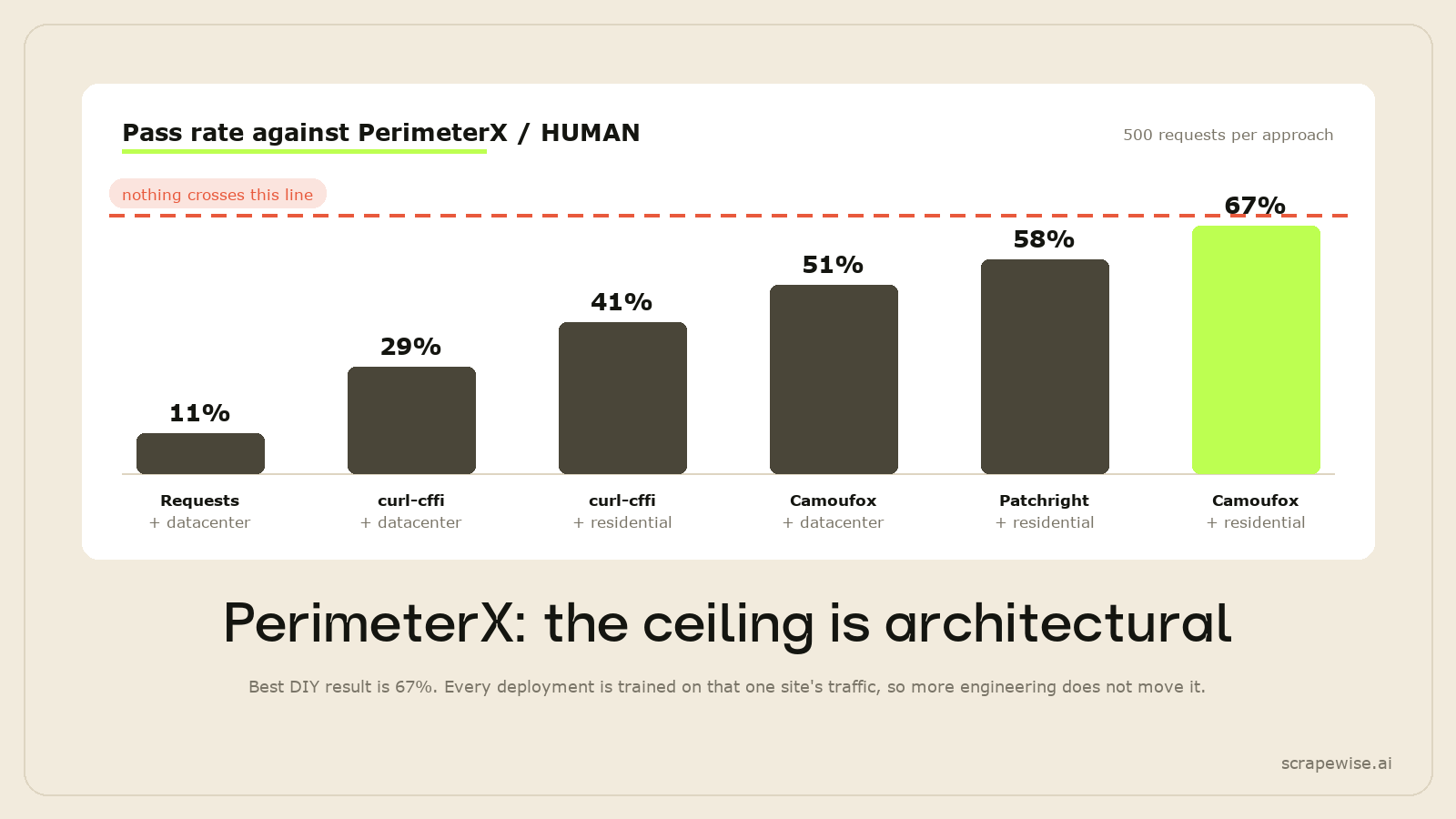
The short version: PerimeterX is the WAF where more engineering pays off least. A stealth browser on residential proxies is the strongest DIY starting point, but it will not give you steady results across sites, and a TLS-impersonating HTTP client such as curl-cffi, which is the first thing to try on Akamai, gets much less far here.
That is not mainly a tuning problem. It follows from how the detection is built: HUMAN describes its detection as self-tuning to each customer's website, and its sensor keeps collecting signals for the whole session. This post explains what the model checks, why the usual tool rankings scramble, and the realistic responses once you accept that. ScrapeWise publishes this blog and sells a scraping API, so read the last section with that in mind.
Confirm You Are Actually Facing PerimeterX
PerimeterX merged with HUMAN Security (formerly White Ops) in July 2022 (Help Net Security), but the cookies and endpoints still carry the old name, and so does most of the scraping community. Three signals identify it:
| Signal | Where to look |
|---|---|
_pxhd and _pxvid cookies |
Response cookies on first page load |
/api/v2/collector requests |
Network tab, telemetry posting back during the session |
| PRESS & HOLD challenge | The distinctive hold-the-button interstitial, not a checkbox |
If you see _abck and sensor_data instead, that is Akamai, a different model with different answers, covered in bypassing Akamai Bot Manager v4. __ddg cookies mean DataDome. cf-ray means Cloudflare. Debugging a bypass against the wrong detection model is the most expensive mistake available.
For a faster read on whether a target is protected at all, paste a category page into our free product URL extractor. It makes one plain, unrendered request and reports whether the page came back directly, whether it had to retry through a proxy, or whether the HTML contains almost no links.
Why the Ceiling Is Architectural, Not Technical
Most WAFs compare your traffic against a global model of what browsers and bots look like. Beat the global model and you are through on most sites running that WAF.
HUMAN tunes to the site. Its Bot Defender documentation describes the detection as "self-tuning to address the customer's website structure and business metrics", built on machine-learning models that are "continuously updated" (HUMAN detection overview, checked Nov 2026). In practice the question is less "does this look like a browser?" and more "does this look like this site's visitors?"
Two consequences follow, and both are uncomfortable:
- A setup that works on one PerimeterX target may fail on the next. Two sites running the same product can have very different visitor baselines. There is no single configuration to find.
- Your fingerprint can be too clean. Camoufox's patched Firefox binary is a genuine advantage on Cloudflare. On a retail site where most real visitors are on Chrome, a Firefox fingerprint is a statistical outlier, even a perfect one.
That second point is why the usual tool rankings scramble here. The browser-distribution question matters as much as the fingerprint-quality question, and no amount of patching resolves the tension.
What PerimeterX Checks
HUMAN says its cloud detector "processes hundreds of live signals collected on the client by the HUMAN Sensor", including device rendering features, network indicators, and "user-interaction anomalies within mouse clicks, screen touches, cadence and timing" (same documentation page). It helps to group them into four layers, evaluated across the session rather than once at the door:
1. Browser fingerprint. Canvas, WebGL renderer, audio context, font enumeration. Standard, and the layer most stealth tooling is built to address.
2. Behavioural signals. Mouse trajectory, typing cadence, scroll velocity. Judged against what real users on that domain do, not against a generic "is this a human" threshold.
3. Session graph. Which pages were visited, in what order, with what dwell times. A session that lands on three product pages and nothing else does not match a shopping pattern, however convincing the browser fingerprint is.
4. Network graph. Whether this IP's behaviour across sessions matches legitimate users. This is the layer that catches otherwise-clean scrapers over time: any individual session passes, and the aggregate pattern does not.
This is why curl-cffi does badly here. Against Akamai, skipping the browser skips the JavaScript telemetry problem and the trade is usually worth it. Against PerimeterX the sensor is the detection, so a client that never sends any client-side signals is itself the anomaly.
What Each Approach Fixes Against PerimeterX
Here is which layers each common combination addresses. It is a reasoning aid, not a measurement: on this WAF especially, results differ from site to site.
| Approach | Browser fingerprint | Sends sensor and behaviour signals | IP reputation | Relative compute cost |
|---|---|---|---|---|
| Requests library + datacenter proxies | No | No | Low | Lowest |
| curl-cffi + datacenter proxies | TLS only | No | Low | Low |
| curl-cffi + residential proxies | TLS only | No | Higher | Low |
| Camoufox + datacenter proxies | Real Firefox | Yes | Low | High |
| Patchright + residential proxies | Real Chromium | Yes | Higher | High |
| Camoufox + residential proxies | Real Firefox | Yes | Higher | Highest |
Compare it with Akamai. There, the cheapest row that fixes the TLS layer is the first thing to try. On PerimeterX only the browser rows even take part in the sensor conversation, so the expensive end of the table is where you start, and it still does not guarantee anything.
The PRESS & HOLD Challenge
When PerimeterX escalates, it serves a press-and-hold interstitial rather than a checkbox or an image grid. HUMAN's documentation says the HUMAN Challenge monitors "mouse, touch, and keyboard events" on the challenge, and uses honeypots such as "fake CAPTCHA tokens, multiple iframes and fake events" to catch solvers (HUMAN Challenge docs, checked Nov 2026). HUMAN also says the button can trigger a small proof-of-work task on the device (HUMAN blog).
curl-cffi cannot answer it at all, because there is no DOM to hold a button in. A browser can attempt it, but the challenge is built specifically to catch automated solving. Treat a rising challenge rate as a signal that something upstream in your fingerprint or session graph has degraded, not as a cost of doing business.
If the escalation is firing on most sessions, solving it is treating a symptom. Fix the session graph first.
The Three Changes Worth Making
Given the ceiling, only a few things actually help.
Use a Chromium-based browser, not Firefox, sometimes. This inverts the Cloudflare advice. Whether Camoufox or Patchright does better depends on that site's real browser mix. This is the one WAF where it is worth running both for a week on your own targets and comparing, rather than picking on principle.
Build a session graph, not a request list. Scraping five product pages in sequence from a cold session is the most detectable pattern on this WAF. Entering via a category page, dwelling, moving to a product, moving back: the navigation shape matters more here than anywhere else, because it is compared against that domain's real traffic.
Accept that datacenter proxies are not an option. The network-graph layer weights IP history heavily. Residential is not an optimisation here, it is a prerequisite.
Randomised request intervals matter too: jitter in a 300 to 2,500ms band rather than a fixed sleep. A fixed time.sleep(1) is itself a fingerprint.
What a High Failure Rate Actually Costs
Any failure rate sounds survivable until you put volume behind it. At 10,000 pages a day, every 10% of failures is 1,000 missing pages a day. You have two options and both cost money:
Retry them. Now you are running more requests than you deliver, on the most expensive tooling in the stack. Camoufox's own site puts its footprint at around 200MB per instance (camoufox.com, checked Nov 2026), and every retry is another one.
Skip them. Now your dataset has holes, and the holes are not random. Failures cluster on the targets whose visitor baselines your sessions match worst, which means specific competitors go systematically under-sampled. A price comparison built on that is confidently wrong rather than obviously incomplete.
The second failure mode is worse and gets noticed later. If PerimeterX-protected sites are in your competitive set for competitor price tracking, the gaps land exactly where the data matters.
When to Stop Building Your Own
PerimeterX is the clearest case for not doing this in-house. The usual break-even arguments (maintenance hours, WAF update cadence) apply, but there is a stronger one specific to this WAF: because detection tunes to each site, your engineering effort does not compound. Work spent on one PerimeterX target teaches you little about the next one. On Cloudflare or Akamai, it teaches you most of what you need.
Stop building when any of these are true:
- PerimeterX-protected sites are more than a handful of your targets, so the per-site tuning becomes a standing project rather than a one-off.
- You need data you can put in front of a stakeholder every day, not a setup that works on some sites some weeks.
- Your targets are authenticated, so session state has to survive across a rotating proxy pool on top of everything above.
ScrapeWise (which publishes this blog) runs the fetch layer for you: each page is tried plain first and moved to a real browser or residential IPs only when it is blocked. That will not get through every site, and PerimeterX sites are among the hardest. Some block automated visits outright or need a login, and no tool covers all of them. Pricing is per page and published: €0.15 per 1,000 for plain requests, €0.75 with rendering, €1.50 through the residential tier, and €3.75 for render plus residential, which is the tier PerimeterX targets need.
The honest way to find out is to try your own targets. Run a few of your PerimeterX-protected competitor URLs through ScrapeWise: the first 5 requests are free, no card needed.
Related reading: bypassing Akamai Bot Manager, where the advice inverts and the cheapest approach is the first to try, and the full three-WAF comparison covering Cloudflare alongside both.
Paste a URL that blocks your scraper
Browser rendering and residential proxies are built in. No proxies to manage, pay per page from €0.15 per 1,000.
Not ready to sign up? See 12 real Amazon rows, 972 columns →
5 free requests no credit card · from €0.15 per 1,000 pages · or call it from Python or MCP →