

You scrape 10,000 product prices from competitors. Your pricing system feeds the data into a pricing engine. The engine recommends prices 30% lower than it should. Your sales team implements the recommendation and margin drops €200K.
What happened? The scraped data had quality problems: duplicate entries, missing fields, encoding errors. Your pricing system made decisions on garbage data.
This guide covers how to ensure scraped data is clean enough to feed into critical business systems.
Why Scraped Data Quality Matters
Scraped data is only as good as the system that consumes it.
Bad data → bad decisions:
| Bad Data | Decision | Cost |
|---|---|---|
| Duplicate products (same product listed 5 times) | Underbid 5× on one product | Margin loss |
| Missing prices (null values) | Skip product in analysis | Incomplete competitive data |
| Encoding errors ("Café" instead of "Café") | Name mismatch, product not found | Duplicates in system |
| Wrong currency (€ mixed with $) | Compare prices in different currencies | Wrong pricing decisions |
| Wrong product match ("Blue Shirt S" vs "Shirt Blue Small") | Track wrong product, miss competitor move | Margin loss |
Real example: A retailer's scraper picked up 50 duplicate product listings due to deduplication failure. The pricing system thought there were 50 competitors where there was 1. It underpriced by 25% to "compete". Cost: €50K in lost margin before the error was caught.
Three Levels of Data Quality
Level 1: Field-Level Validation (Basic)
Does each field contain valid data?
Validation rules:
def validate_product_data(product):
  """Return True if product passes quality gates"""

  errors = []

  # Price validation
  if not product.get('price'):
    errors.append('price: missing')
  elif not isinstance(product['price'], (int, float)):
    errors.append('price: not a number')
  elif product['price'] < 0 or product['price'] > 1000000:
    errors.append('price: out of reasonable range')

  # Title validation
  if not product.get('title') or len(product['title'].strip()) < 3:
    errors.append('title: missing or too short')

  # URL validation
  if not product.get('url') or not product['url'].startswith('http'):
    errors.append('url: missing or invalid')

  # Return result
  return len(errors) == 0, errors

# Usage
is_valid, errors = validate_product_data(product)
if not is_valid:
  log_data_issue(product, errors)
  skip_product(product)  # Do not process invalid data
Common validation failures:
- Missing required fields (price, title, URL)
- Wrong data type (price = string instead of float)
- Out-of-range values (price = $0 or $999,999)
- Invalid formats (email not containing @, phone with letters)
- Encoding issues ("Café" instead of "Café")
Level 2: Cross-Field Consistency (Intermediate)
Do fields make sense together?
def validate_consistency(product):
  """Check if fields are logically consistent"""

  errors = []

  # If on sale, sale price should be less than regular price
  if product.get('sale_price') and product.get('regular_price'):
    if product['sale_price'] >= product['regular_price']:
      errors.append('sale_price >= regular_price (invalid discount)')

  # If out of stock, should not have price
  # (or price should be 0)
  if product.get('stock_status') == 'out of stock':
    if product.get('price') and product['price'] > 0:
      errors.append('out of stock but has price')

  # Inventory count should match stock status
  if product.get('inventory_count') == 0:
    if product.get('stock_status') != 'out of stock':
      errors.append('inventory_count=0 but stock_status!=out_of_stock')

  return len(errors) == 0, errors
Level 3: System-Level Quality (Advanced)
Do the data as a whole make sense?
def validate_system_quality(products):
  """Check overall data quality across dataset"""

  metrics = {
    'null_rate': 0,
    'duplicate_rate': 0,
    'out_of_range_rate': 0,
  }

  # 1. Null rate: % of fields that are null
  total_fields = len(products) * len(products[0])
  null_fields = sum(
    1 for p in products for v in p.values() if v is None
  )
  metrics['null_rate'] = null_fields / total_fields

  # 2. Duplicate rate: % of products that are duplicates
  seen_urls = set()
  duplicates = 0
  for product in products:
    if product['url'] in seen_urls:
      duplicates += 1
    seen_urls.add(product['url'])
  metrics['duplicate_rate'] = duplicates / len(products)

  # 3. Out-of-range rate: % of prices outside reasonable bounds
  out_of_range = sum(
    1 for p in products
    if p['price'] < 0 or p['price'] > 1000000
  )
  metrics['out_of_range_rate'] = out_of_range / len(products)

  # Set quality thresholds
  if metrics['null_rate'] > 0.05:  # > 5% nulls
    return False, f"Null rate too high: {metrics['null_rate']}"

  if metrics['duplicate_rate'] > 0.01:  # > 1% duplicates
    return False, f"Duplicate rate too high: {metrics['duplicate_rate']}"

  return True, metrics
Handling Common Data Quality Issues
Issue 1: Duplicate Products
Problem: The same product appears multiple times in your dataset.
Causes:
- Same product listed in multiple categories
- Multiple colour/size variants scraped as separate products
- Pagination loop: page 1 product appears again on page 2
- Same product on retailer's site + marketplace at same domain
Solution: Deduplication by URL
def deduplicate_by_url(products):
  """Remove duplicate products, keeping first occurrence"""

  seen_urls = set()
  unique_products = []

  for product in products:
    if product['url'] not in seen_urls:
      unique_products.append(product)
      seen_urls.add(product['url'])

  return unique_products

# Usage
products_before = 5000
products_after = deduplicate_by_url(products_before)
print(f"Removed {len(products_before) - len(products_after)} duplicates")
Better: Deduplication by SKU/EAN
If you have product codes, deduplicate by those (more robust than URL):
def deduplicate_by_sku(products):
  """Deduplicate by SKU, keeping lowest price"""

  sku_map = {}

  for product in products:
    sku = product.get('sku')

    if not sku:
      continue  # Skip products without SKU

    if sku not in sku_map:
      sku_map[sku] = product
    else:
      # Keep the cheaper price (more competitive)
      if product['price'] < sku_map[sku]['price']:
        sku_map[sku] = product

  return list(sku_map.values())
Issue 2: Missing or Null Fields
Problem: Fields like price, title, or inventory are missing.
Solution: Data Imputation or Rejection
def handle_missing_data(product):
  """Handle missing fields: impute or reject"""

  # Strategy 1: Reject if critical field is missing
  if not product.get('price'):
    return None  # Reject this product

  # Strategy 2: Impute with defaults for non-critical fields
  if not product.get('inventory_count'):
    product['inventory_count'] = None  # Keep as null

  if not product.get('description'):
    product['description'] = ''  # Default to empty string

  # Strategy 3: Look up from fallback source
  if not product.get('sku'):
    product['sku'] = generate_sku_from_title(product['title'])

  return product

# Usage
products = [handle_missing_data(p) for p in products]
products = [p for p in products if p is not None]  # Remove rejected products
Issue 3: Encoding Errors
Problem: Character encoding issues: "Café" instead of "Café"
Solution: Normalize Unicode
import unicodedata

def normalize_encoding(text):
  """Fix encoding issues by normalizing unicode"""

  if not text:
    return text

  # Decode HTML entities
  import html
  text = html.unescape(text)

  # Normalize unicode (decompose and recompose)
  text = unicodedata.normalize('NFKC', text)

  return text

# Usage
product['title'] = normalize_encoding(product['title'])
# "Café" → "Café"
Issue 4: Currency Mismatches
Problem: Prices in different currencies (€, $, £) are compared as if same currency.
Solution: Normalize Currency
def extract_currency_and_price(price_str):
  """Extract currency and numeric price"""

  import re

  # Match currency symbol and price
  match = re.match(r'([$€£¥])\s*([\d,\.]+)', price_str)

  if not match:
    return None, None

  currency = match.group(1)
  price_text = match.group(2)

  # Convert to float
  price = float(price_text.replace(',', '').replace('.', ''))

  # Map symbol to code
  currency_map = {'$': 'USD', '€': 'EUR', '£': 'GBP', '¥': 'JPY'}
  currency_code = currency_map.get(currency, 'UNKNOWN')

  return currency_code, price

# Usage
currency, price = extract_currency_and_price('€25.99')
# Returns: ('EUR', 25.99)

# Store both fields
product['price'] = 25.99
product['currency'] = 'EUR'

# Compare prices only if currency matches
if product1['currency'] == product2['currency']:
  price_diff = product1['price'] - product2['price']
Issue 5: Product Matching Across Sites
Problem: Same product listed on 3 different sites with different product names and IDs. How do you know they are the same product?
Example:
- Site A: "ASICS Gel-Lyte III Black Sneaker Size 10"
- Site B: "Asics Gel Lyte III Blk M 10"
- Site C: "Gel Lyte III - Black - 10"
Solution: Multi-Factor Matching
def match_products(product_a, product_b):
  """Determine if two products are the same using multiple signals"""

  score = 0

  # Factor 1: Brand + Title similarity (40% weight)
  if product_a.get('brand') == product_b.get('brand'):
    score += 10

  from difflib import SequenceMatcher
  title_sim = SequenceMatcher(
    None,
    product_a.get('title', '').lower(),
    product_b.get('title', '').lower()
  ).ratio()

  if title_sim > 0.8:  # 80% textual match
    score += 20

  # Factor 2: EAN/SKU match (40% weight)
  if product_a.get('ean') and product_b.get('ean'):
    if product_a['ean'] == product_b['ean']:
      score += 40

  # Factor 3: Price similarity (20% weight)
  if product_a.get('price') and product_b.get('price'):
    price_diff = abs(
      product_a['price'] - product_b['price']
    ) / product_a['price']

    if price_diff < 0.05:  # Within 5%
      score += 20

  # Decision: Match if score > 70
  return score > 70, score

# Usage
is_match, score = match_products(product_a, product_b)
if is_match:
  print(f"Products matched with score {score}")
  # They are the same product
else:
  print(f"Products are different (score {score})")
Building a Data Quality Dashboard
Track data quality metrics over time.
class DataQualityMonitor:
  def __init__(self):
    self.metrics_history = []

  def measure_quality(self, products, scraper_name):
    """Measure quality metrics for a scraper run"""

    total = len(products)

    metrics = {
      'timestamp': datetime.now(),
      'scraper': scraper_name,
      'total_rows': total,
      'null_rate': sum(1 for p in products for v in p.values() if v is None) / (total * len(products[0])),
      'duplicate_rate': len(products) - len(set(p['url'] for p in products)) / len(products),
      'invalid_prices': sum(1 for p in products if not isinstance(p.get('price'), (int, float))),
      'missing_titles': sum(1 for p in products if not p.get('title')),
    }

    self.metrics_history.append(metrics)

    # Alert if quality drops
    if metrics['null_rate'] > 0.05:
      alert(f"Data quality warning: {scraper_name} has {metrics['null_rate']*100}% nulls")

    return metrics

# Usage
monitor = DataQualityMonitor()

for run in daily_scraper_runs:
  quality = monitor.measure_quality(run['products'], run['scraper_name'])
  print(f"Quality score: {100 - quality['null_rate']*100:.1f}%")
Dashboard visualization:
| Scraper | Last 7 Days Avg Quality | Trend | Alert |
|---|---|---|---|
| H&M Prices | 99.2% | ↑ Improving | ✓ OK |
| ASOS Inventory | 96.8% | ↓ Declining | ⚠️ Watch |
| Amazon Sellers | 98.1% | → Stable | ✓ OK |
| Zara Trending | 94.5% | ↓ Declining | ❌ Poor |
Data Quality Checklist
Use this before deploying any scraper or feeding data to a downstream system:
Field-Level Validation:
- All required fields are present (< 5% nulls)
- Numeric fields (price, inventory) are numbers, not strings
- Prices are in reasonable range (not $0 or $999,999)
- URLs are valid and start with http
- Encoding is correct (no "Café" artefacts)
Cross-Field Consistency:
- Sale price < regular price
- Out of stock items do not have price
- Inventory count consistent with stock status
- Dates are in the past or near future (not 2050)
System-Level Quality:
- Duplicates removed or flagged (< 1% rate)
- Null rate acceptable (< 5%)
- Row count within expected range (±20%)
- Data freshness acceptable (< 24 hours old)
Product Matching:
- Cross-site duplicates merged (if matching)
- Product IDs stable (same product = same ID)
- Colour/size variants handled correctly
- Matches verified spot-check (10 products)
Real Example: E-commerce Pricing System
Scenario: A retailer feeds scraped competitor prices into an automated repricing system.
The problem:
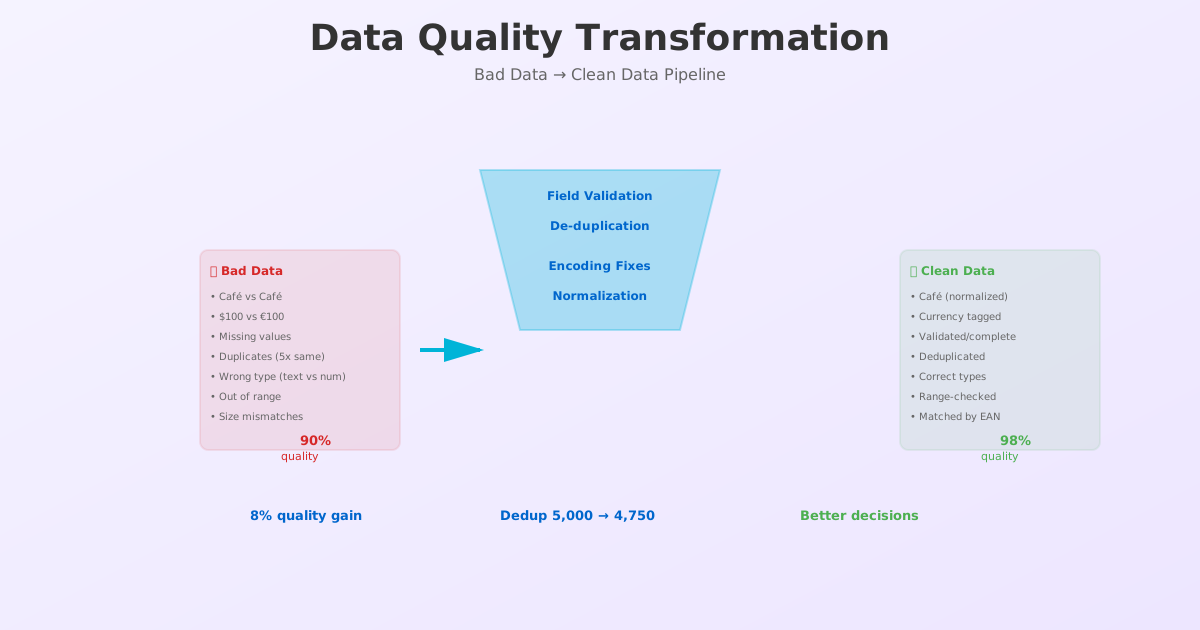
- Competitor price feed contains 5% duplicates (same product listed multiple times)
- Missing price on 2% of products (null values)
- Some prices are 10× higher than realistic (data errors)
- Currency codes missing (can't tell if $100 USD or $100 CAD)
Result:
- System tries to price against 5 copies of the same product
- Gaps in data cause system to default to high prices
- Wrong currency causes system to underprice by 20%
- Margin loss: €150K in one quarter
The fix:
- Deduplicate products by EAN (removes 5% duplicates)
- Reject products with missing prices (removes 2% invalid rows)
- Validate price range: reject prices > 10× median (removes outliers)
- Require currency code on all prices (prevents currency mismatch)
Result:
- Data quality improves from 90% to 98%
- Repricing decisions now based on clean data
- Margin improves €40K per quarter (reduces underbidding)
Conclusion: Quality Data Requires Discipline
Scraped data is not "raw data." It is data that requires verification before use.
The companies with the most reliable pricing and inventory systems invest in data quality:
- Validation rules
- Deduplication
- Monitoring dashboards
- Regular audits
It takes effort, but it pays for itself.
Ready to improve your data quality? Try ScrapeWise's data quality validation — automatic validation, deduplication, and quality scoring.
Paste any URL — ScrapeWise handles the anti-bot
Managed infrastructure that adapts when sites change. No proxies, no code, no per-request fees.
Not ready to sign up? See 12 real Amazon rows, 972 columns →
97% accuracy on Amazon benchmarks · no credit card · book a 15-min call →