

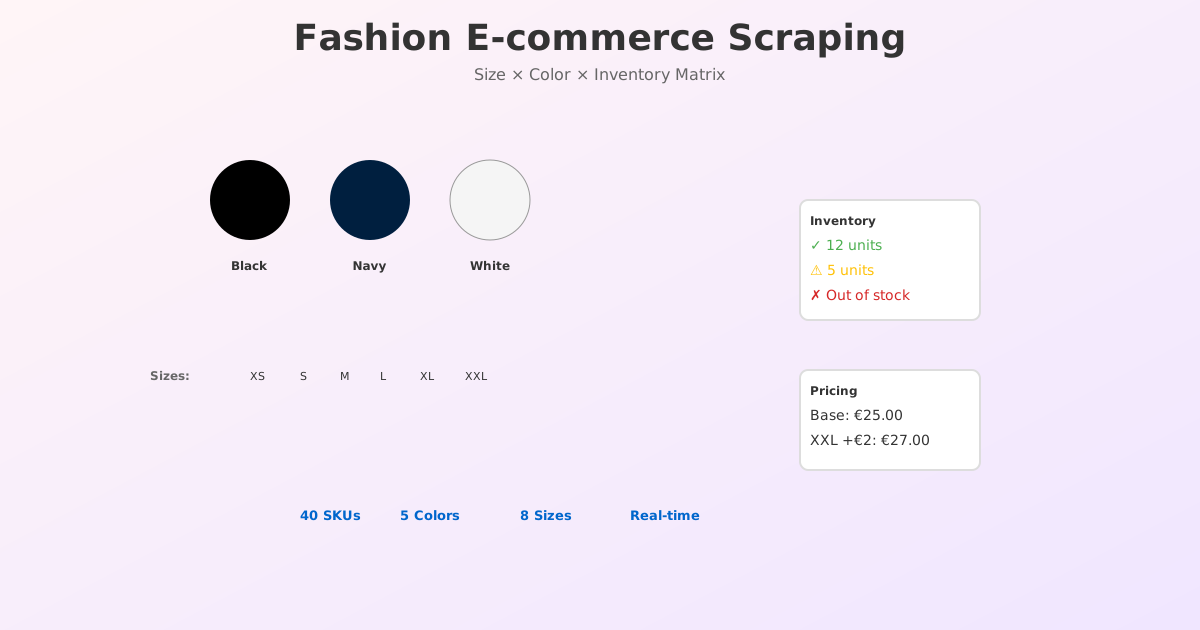
Fashion e-commerce is unlike any other vertical. A product does not exist as one unit. A sweater is 5 colours × 8 sizes = 40 distinct products. Inventory changes by the minute. A style sells out in 48 hours. Competitors redesign their sites 3–4 times per year.
If you scrape using the same techniques that work for electronics or home goods, you will miss critical data, hit rate-limiting faster, and wake up to 404s after a site redesign.
This guide covers the unique challenges of fashion scraping and the patterns used by every major fashion retailer.
Why Fashion Needs Real-Time Scraping
Fashion operates on velocity. Fast-fashion retailers like H&M, Zara, and ASOS launch new styles weekly. Inventory windows are measured in days, not months.
Manual competitive monitoring is impossible in fashion for two reasons:
1. Volume of SKUs
A typical clothing brand has:
- 200+ styles per season
- 5–8 colours per style
- 4–12 sizes per colour
- = 5,000–20,000 SKUs
No competitor monitoring team can check this manually.
2. Inventory Velocity
Fashion inventory changes hourly, not daily:
- Peak seasons (Black Friday, new launches) see 1,000s of stock moves per hour
- A style available at 9am can be sold out by 5pm
- Delayed inventory data (24+ hours old) is useless
The fashion companies winning on margin are the ones scraping competitor stock and prices every 30 minutes, not every day.
Fashion-Specific Data Points You Need
Fashion scraping requires capturing more granular data than other verticals. Here is the complete data model:
Product-Level Data
| Field | Example | Why It Matters |
|---|---|---|
| Product ID / Style Code | TS-2024-001-BLK-S |
De-duplication across variants |
| Title | "Organic Cotton T-Shirt" | Search ranking, product discovery |
| Description | "Sustainably sourced cotton, machine wash" | Content for comparison |
| Category | "Women > Tops > T-Shirts" | Category analysis |
| Brand | "Everlane" | Brand-level monitoring |
| Base Price | €32.00 | Price positioning |
| Sale/Discount Price | €24.00 | Discount depth tracking |
| Materials | "100% Organic Cotton" | Differentiator |
| Care Instructions | "Machine wash cold" | Attribute matching |
Variant-Level Data (Critical for Fashion)
| Field | Example | Why It Matters |
|---|---|---|
| Colour | "Black", "Navy", "White" | Seasonal trend (which colours sell) |
| Size | "XS", "S", "M", "L", "XL", "XXL" | Inventory by size (critical) |
| SKU/Variant ID | TS-2024-001-BLK-M |
Individual inventory tracking |
| Price (Variant) | €32.00 (base) → €36.00 (XXL upcharge) | Size-specific pricing |
| Inventory Status | "In Stock", "Low Stock", "Out of Stock" | Real-time availability |
| Inventory Count | 12 units | Exact stock level |
| Restocking Date | "Expected back 15 Nov" | Future availability |
| Last Updated | 2026-11-02T14:23:00Z |
Data freshness |
Five Challenges Unique to Fashion Scraping
Challenge 1: Variant Explosion & Page Structure
The problem: Fashion sites organize variants differently, and each approach breaks different scrapers.
Pattern 1: Single Page, All Variants
→ H&M, Uniqlo, Forever 21
→ All sizes/colours shown on one page
→ Dropdowns or grid buttons to select
→ Click = page updates with new image/price (no URL change)
Pattern 2: Variant URLs
→ ASOS, Boohoo, Fashion Nova
→ Each size/colour = separate URL
→ /sweater-black-m.html, /sweater-black-l.html
→ Different prices/inventory per URL
→ Need to scrape all URL variants
Pattern 3: Nested Product Pages
→ Zara, COS
→ Base product page = no inventory data
→ Must click "select size" → new page loads → inventory appears
→ Javascript-dependent reveal
Solution: Pre-scan a site to identify its variant pattern before building your scraper.
- H&M: Request body includes colour/size filters
- ASOS: Variant URLs in JSON-LD
@grapharray - Zara: React state with
window.__INITIAL_STATE__
Challenge 2: Lazy Loading & JavaScript-Heavy Pages
Most fashion sites are React/Vue/Next.js SPAs. Images load on scroll. Inventory counts are rendered client-side.
The problem:
- Curl request returns empty page (no product data)
- Headless browser loads data 2–5 seconds after page load
- Timeout = empty data
The solution: Use a headless browser (Puppeteer, Playwright) with:
- 5-second minimum wait after page load
waitForSelectorfor inventory element- Network idle detection if available
await page.goto(url, { waitUntil: 'networkidle2' });
const inventory = await page.$eval('.inventory-count', el => el.textContent);
Challenge 3: Inventory by Size Matrix
One of the hardest parts: scraping a size × colour inventory matrix.
Most fashion sites show inventory in this format:
- Select a colour → Inventory grid appears below
- Grid shows: Size S (10 units), M (5 units), L (0 units)
- Each size might have different price
The problem: A naive scraper loops through sizes and misses that each click changes the DOM.
The solution: Matrix detection
const colours = ['Black', 'Navy', 'White'];
const sizes = ['XS', 'S', 'M', 'L', 'XL'];

for (const colour of colours) {
  // Click colour button
  await page.click(`[data-colour="${colour}"]`);
  await page.waitForNavigation(); // Wait for content to load

  // Extract inventory for all sizes in this colour
  for (const size of sizes) {
    const inventory = await page.$eval(
      `[data-size="${size}"] .stock-count`,
      el => el.textContent
    );
    // Save as: Black-M: 5, Black-L: 0
  }
}
Challenge 4: Anti-Bot & Rate Limiting
Fashion sites are aggressively anti-bot because scrapers directly impact sales teams' commissions (inventory gaps = lost sales).
Common blocks:
- Cloudflare / DataDome (aggressive on fashion)
- Per-IP rate limits: 100 requests/hour (stricter than other verticals)
- TLS fingerprinting & bot detection on variant endpoints
- JavaScript challenge on repeat requests
Solution:
- Use rotating residential proxies (home IPs, not datacenter)
- Add 1–2 second delays between requests
- Rotate User-Agent headers
- Use curl/browser automation, not raw socket requests
- Monitor response codes: 429 = back off immediately
Challenge 5: Seasonal Site Redesigns
Fashion retailers redesign their sites before every major season (Spring, Summer, Fall, Winter).
A selector that worked in September is dead in November.
The problem:
div.price→span.cost(renamed).grid-item:nth-child(2)→:nth-child(3)(layout reflow)/product/<id>→/products/<id>(URL pattern change)- JSON-LD schema moved from
<head>to end of<body>
Your scraper wakes up to 404s or null values.
Solution: Use stable selectors
- Avoid
nth-child(position-dependent) - Use
data-*attributes (most stable) - Use JSON-LD when available (schema is mandated by search engines, rarely changes)
- Monitor for breakage: set alerts on null/empty results
How to Handle Variant Pages: H&M and ASOS Patterns
Pattern A: H&M (Single-Page, AJAX Requests)
H&M renders all inventory on one page but loads colours via AJAX.
URL: hm.com/en_us/productpage.1234567.html
GET hm.com/en_us/productpage.1234567.html
  → Returns HTML with colours list

For each colour, make XHR request:
GET hm.com/en_us/api/checkout/v1/product/1234567?colour=Black
  → Returns JSON with inventory for all sizes in that colour
Scraper approach:
- Load product page
- Extract colour list from JSON-LD or HTML
- For each colour, make API request directly (skip page reload)
- Parse inventory JSON
Pattern B: ASOS (Variant URLs)
ASOS creates a separate URL for each colour + size combination.
URL: asos.com/item/black-sweater/prd123?colour=Black&size=M
URL: asos.com/item/black-sweater/prd123?colour=Black&size=L
URL: asos.com/item/black-sweater/prd123?colour=Navy&size=M
Problem: This generates 40+ URLs per product (5 colours × 8 sizes).
Solution: Batch scraping
1. Load main product page
2. Extract base URL + available colour/size list from JSON-LD
3. Generate all variant URLs (Black-M, Black-L, Navy-M, etc.)
4. Queue all URLs for scraping
5. Deduplicate across the variant set by SKU/product ID
Pattern C: Zara (React State)
Zara renders everything client-side. Inventory is in React state.
GET zara.com/en/product/sweater/1234567
  → HTML is mostly empty
  → <script>window.__INITIAL_STATE__ = {...inventory, sizes, colours...}</script>
Solution: Extract JSON from window.__INITIAL_STATE__
const html = await fetch(url).then(r => r.text());
const match = html.match(/window\.__INITIAL_STATE__\s*=\s*(\{.*?\});/s);
const state = JSON.parse(match[1]);
const inventory = state.product.variants; // All sizes/colours
Real-Time Inventory Monitoring: The Dashboard Pattern
Once you are scraping fashion inventory, build a simple monitoring dashboard:
| Metric | Why It Matters |
|---|---|
| Stock Level Change | Competitor is repricing (usually down) |
| Colour Popularity | Which colours sell fastest |
| Size Distribution | Spot if a size is undersold (quality issue) |
| Days-to-Stockout | Velocity of a style (early signal of trend) |
| Restocking Patterns | When do they restock? (Wed mornings?) |
| Price Elasticity by Size | Do they charge more for XXL? |
Example: Monitor if a bestselling competitor product goes from "In Stock: 50" to "In Stock: 8" to "Out of Stock" within 3 days — this is a trend signal. Launch that style immediately while the customer appetite is proven.
Three Fashion Retailer Case Studies
Case Study 1: ASOS Competitor Tracking (E-commerce Team)
Goal: Monitor top 500 ASOS styles for price/inventory trends
Challenge: ASOS has 40,000+ products. Need to prioritize.
Solution:
- Scrape ASOS bestseller category daily
- Select top 100 products by reviews (proxy for popularity)
- For each, scrape all 5 colours × 8 sizes (40 variant URLs)
- Track inventory depletion rate
Results:
- Identified 12 trending styles 3–5 days before competitors
- Launched copies while competitor was still high-inventory
- First-mover advantage: 40% higher margin on trend items
Case Study 2: Inventory Arbitrage (Multi-Channel Seller)
Goal: Sell the same items across Amazon, eBay, own website
Challenge: Inventory across 3 channels can go negative (sell on Amazon, forget to update eBay)
Solution:
- Scrape own website inventory every 15 minutes
- If inventory hits 0 on website, automatically delist on Amazon/eBay
- If inventory increases (restock), auto-relist
- Scrape competitor sites to spot when they restock (signal to reprice)
Results:
- Reduced negative inventory incidents from 5/month to 0
- Improved customer satisfaction (fewer cancellations)
- Repricing now beats competitors by 2–4 hours on average
Case Study 3: Zara Trend Analysis (Fashion Analyst Team)
Goal: Identify emerging trends at Zara before they become mainstream
Solution:
- Scrape Zara's "New Arrivals" section 3× daily
- Track: colour, silhouette, material
- Flag styles that appear in multiple categories (signal of trend adoption)
- Compare to runway/Pinterest/TikTok trends
Results:
- Predicted Q2 colour trend ("dopamine dressing" → brights) 6 weeks before competitors
- Sourced bright inventory while competitors were still ordering neutrals
- Trend items sold 60% faster than non-predicted inventory
Data Quality Challenges in Fashion Scraping
Fashion scraping introduces unique data quality issues:
| Issue | Example | Solution |
|---|---|---|
| Encoding on accents | "Café" vs "Café" | Normalize Unicode |
| Size labeling inconsistency | Some use "XS", others use "0", others use "Petite S" | Map to standard sizing |
| Inventory not a number | "Only 2 left!", "In stock", "Back soon" | Parse text or use booleans |
| Colour duplication | "Black" vs "Jet Black" vs "Charcoal" | Cluster similar colour names |
| Price currency | Scrape USD from US site, EUR from EU — compare wrong | Track currency codes |
| Variant mismatch | Same product, different variant IDs per retailer | Use product image/name dedup |
Getting Started: Your First Fashion Scraper
Step 1: Pick a Target Fashion Site
Start small:
- Single retailer (H&M or ASOS, not 10 at once)
- Narrow category (tops, not entire site)
- 20–50 products (not thousands)
Step 2: Detect the Variant Pattern
Visit 5 products and identify:
- Do all variants appear on one page? (H&M)
- Are variants separate URLs? (ASOS)
- Is data in HTML or JavaScript state? (Zara)
Step 3: Build Data Model
Define: What are you scraping?
For each product:
  - Title, price, colours

For each variant:
  - Size, inventory count, variant SKU
Step 4: Start with 10 Products
Test on a small set before scaling to thousands:
- Verify data accuracy (spot-check prices against live site)
- Monitor for rate-limiting
- Adjust selectors if site changes
Step 5: Monitor & Alert
Set up monitoring:
- Daily run success rate
- Data freshness (is data < 6 hours old?)
- Scraper health checks (if 5 runs fail in a row, notify)
Tools & Resources for Fashion Scraping
| Tool | Best For | Cost |
|---|---|---|
| ScrapeWise | Multi-source fashion tracking | €500–2,000/mo |
| Bright Data | Residential proxies + managed scraping | €500/mo + usage |
| Puppeteer / Playwright | Headless browser for JS rendering | Free (open source) |
| Fashion APIs | Shopify, Magento data (if available) | €100–500/mo |
When NOT to Scrape Fashion Sites
Scraping is not always the answer:
- If the site provides an API → Use it (better data, legal clarity)
- If you are scraping personal data (reviews with author names, customer comments) → GDPR applies
- If the site explicitly forbids scraping in ToS → Risk of legal action (though enforcement is rare)
- If you are only checking 2–3 competitor sites → Manual monitoring is faster
Conclusion: Fashion Scraping Is Essential for Competitive Parity
The fashion industry moves fast. Competitors who scrape have a 3–5 day lead on trend identification, inventory planning, and repricing. Those who rely on manual monitoring are always playing catch-up.
If you are in fashion e-commerce, real estate, or any vertical where inventory and styles change rapidly, scraping is not an optimization — it is table stakes.
Ready to start scraping fashion? Try ScrapeWise's pre-built fashion template — works on H&M, ASOS, Zara, and 50+ other retailers.
Paste any URL — ScrapeWise handles the anti-bot
Managed infrastructure that adapts when sites change. No proxies, no code, no per-request fees.
Not ready to sign up? See 12 real Amazon rows, 972 columns →
97% accuracy on Amazon benchmarks · no credit card · book a 15-min call →