

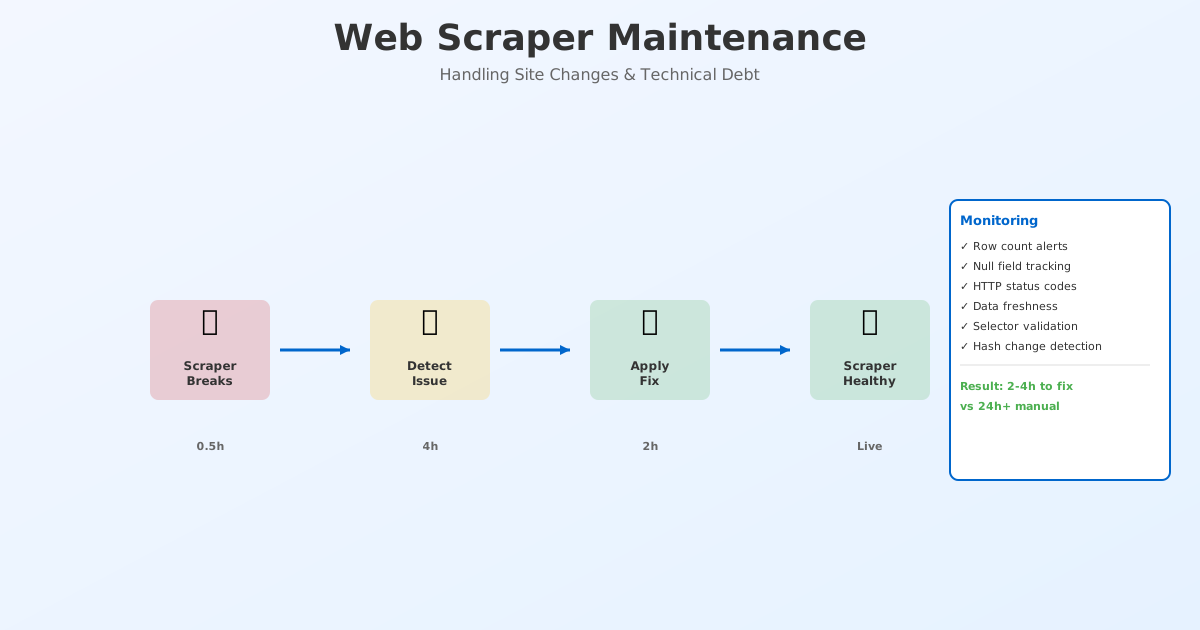
A scraper is not a "set it and forget it" tool. It is a living system that requires feeding.
Every website changes. HTML structure updates. JavaScript frameworks migrate. Anti-bot protections evolve. What works today breaks tomorrow.
The difference between a scraper that runs reliably for years and one that breaks every month is maintenance.
This guide covers the operational side of web scraping: detecting breaks before they become crises, monitoring for site changes, and building a sustainable scraper operation.
Why Scrapers Break: The Top 5 Causes
1. Site Redesigns & DOM Restructuring (30% of breaks)
The most common break. A website restructures their HTML:
- Before:
<div class="product"><span class="price">$25</span></div> - After:
<div class="item"><span class="cost">$25</span></div>
Your selector .product .price returns null. Data stops flowing.
Seasonal risk: Fashion, retail, and seasonal industries redesign quarterly (Spring/Summer, Fall/Winter). These breaks are predictable.
2. JavaScript & Framework Changes (25% of breaks)
A site migrates from jQuery to React. Or from React to Svelte. The page structure remains the same, but data loading mechanism changes:
- Before: Data in HTML on page load
- After: Data loaded asynchronously, requires waiting
Your curl-based scraper, which worked for 2 years, now gets empty pages.
3. Anti-Bot Protection Upgrades (20% of breaks)
Websites upgrade anti-bot tools or detection:
- Added Cloudflare: HTTP 403 Forbidden
- Added bot detection: Extra headers required
- Rate limits tightened: 429 errors start appearing
- IP blocking: Your datacenter IP is blocked
4. API / robots.txt Changes (15% of breaks)
The website updates robots.txt to disallow paths you depend on. Or they move an API endpoint. Or they add a Disallow rule specifically for your scraper patterns.
5. Content Structure Changes (10% of breaks)
Product names moved from <h1> to <h2>. Prices moved from span to data-price attribute. Size options changed from dropdown to radio buttons.
Strategy 1: Automated Monitoring (Detect Breaks in Hours, Not Days)
The goal is to know within 4 hours when a scraper breaks, not 3 days later.
Pattern 1A: Row Count Monitoring
The simplest, most effective monitoring: track the row count of every scraper run.
def monitor_row_count(scraper_name, new_row_count, historical_average):
  """Alert if row count deviates significantly"""

  variance = (new_row_count - historical_average) / historical_average

  if variance < -0.20:  # More than 20% drop
    alert(severity="CRITICAL",
          message=f"{scraper_name}: Row count dropped from {historical_average} to {new_row_count}")

  elif variance < -0.10:  # 10-20% drop
    alert(severity="WARNING",
          message=f"{scraper_name}: Row count at {new_row_count} (usually {historical_average})")

  # Track this run
  log_row_count(scraper_name, new_row_count, datetime.now())
Example:
- Historical average: 1,000 products per run
- Tuesday run: 995 products (0.5% variance) → OK
- Wednesday run: 750 products (-25% variance) → ALERT
- Human inspection: Site redesigned. Selectors need updating.
Pattern 1B: Null/Empty Field Monitoring
Track which fields are returning null more often than usual.
def monitor_field_quality(scraper_name, extracted_data):
  """Alert if field null rate exceeds threshold"""

  field_nulls = {
    'price': sum(1 for item in extracted_data if not item.get('price')),
    'title': sum(1 for item in extracted_data if not item.get('title')),
    'inventory': sum(1 for item in extracted_data if not item.get('inventory')),
  }

  for field, null_count in field_nulls.items():
    null_rate = null_count / len(extracted_data)

    if null_rate > 0.10:  # More than 10% nulls
      alert(severity="CRITICAL",
            message=f"{scraper_name}: {field} is null in {null_rate * 100}% of rows")
Pattern 1C: HTTP Status Code Monitoring
Track HTTP response codes across all scraper runs.
def monitor_http_health(scraper_name, http_codes):
  """Alert on unexpected status codes"""

  expected_codes = {200}  # Usually just 200
  unexpected = [code for code in http_codes if code not in expected_codes]

  if 403 in http_codes:
    alert(severity="CRITICAL", message="403 Forbidden: IP may be blocked")

  if 429 in http_codes:
    alert(severity="CRITICAL", message="429 Rate Limited: Reduce request rate")

  if sum(1 for c in http_codes if c >= 500) > 5:
    alert(severity="WARNING", message="Multiple 500 errors: Site may be down")
Building a Monitoring Dashboard
Track all scrapers in one place:
| Scraper | Last Run | Row Count | Status | Hours Since Update |
|---|---|---|---|---|
| H&M Prices | 2h ago | 2,451 | ✓ OK | 2 |
| ASOS Inventory | 4h ago | 1,245 | ⚠️ LOW | 4 |
| Zara Trends | Failed | - | ❌ DOWN | 24 |
| Amazon Sellers | 1h ago | 5,623 | ✓ OK | 1 |
Alert thresholds:
- 🔴 Critical: No data (> 24h since last run) or 0 rows returned
- 🟠 Warning: 10–20% drop in row count, runs older than 12 hours
- 🟢 OK: Expected row count range, runs within last 6 hours
Strategy 2: Automated Testing (Catch Breaks Before Production)
Before deploying a scraper, verify it works. Test again regularly.
Test Pattern 1: Sample Data Validation
Scrape a known set of URLs. Verify the extracted data is correct.
def test_scraper_accuracy():
  """Test against known products with known data"""

  test_cases = [
    {
      'url': 'https://example.com/product/123',
      'expected_title': 'T-Shirt Blue',
      'expected_price': 25.00,
    },
    {
      'url': 'https://example.com/product/456',
      'expected_title': 'Jeans Black',
      'expected_price': 75.00,
    },
  ]

  for test_case in test_cases:
    result = scrape_product(test_case['url'])

    assert result['title'] == test_case['expected_title'], \
      f"Title mismatch. Got {result['title']}"

    assert result['price'] == test_case['expected_price'], \
      f"Price mismatch. Got {result['price']}"
Run this test:
- After every code change
- Weekly on production data (automated)
- After you detect a site redesign
Test Pattern 2: Selector Stability Test
Verify selectors still find elements.
def test_selectors(page_html, selectors):
  """Verify selectors find expected elements"""

  from bs4 import BeautifulSoup
  soup = BeautifulSoup(page_html, 'html.parser')

  for field, selector in selectors.items():
    elements = soup.select(selector)
    assert len(elements) > 0, f"Selector {field} found no elements"
Test Pattern 3: Regression Testing
After a scraper break is fixed, test that the fix works and does not break other fields.
def test_regression():
  """Before: price scraping broken. After: price scraping fixed."""

  # Setup: Get a product page that caused the original failure
  url = 'https://example.com/product-that-broke-scraper'
  result = scrape_product(url)

  # Test 1: Price is now extracted (the bug that was fixed)
  assert result['price'] is not None, "Price is still null"
  assert result['price'] > 0, "Price is 0 or negative"

  # Test 2: Other fields did not break (regression)
  assert result['title'] is not None, "Title broke when fixing price"
  assert result['inventory'] is not None, "Inventory broke when fixing price"
Strategy 3: Version Control for Scraper Configs
Treat your scraper configurations like code.
# scraper_config_v3.2.yaml
name: "H&M Product Prices"
version: "3.2"
updated: "2026-11-01"

selectors:
  title: "[data-product-title]"  # Changed from .product-name in v3.1
  price: "[data-price]"
  availability: "[data-in-stock]"

# Fallback selectors if primary fails
fallback_selectors:
  title: "h1"
  price: ".cost"

change_log:
  v3.2:
    date: "2026-11-01"
    reason: "Site redesign 2026-11-01"
    changed: "title selector (.product-name → [data-product-title])"

  v3.1:
    date: "2026-09-15"
    reason: "Anti-bot protection upgrade"
    changed: "Added User-Agent rotation, retry logic"

  v3.0:
    date: "2026-08-01"
    reason: "Initial release"
Benefits:
- Rollback to previous config if a change breaks things
- See what changed and when
- Explain why a change was needed
Strategy 4: Change Detection (Know When a Site Changed)
Automatically detect when a website has changed so you can act proactively.
Detection Pattern 1: HTML Hash Monitoring
import hashlib
from datetime import datetime

def detect_site_changes():
  """Detect if site structure changed by comparing HTML hash"""

  url = 'https://example.com/product/123'
  response = requests.get(url)
  current_hash = hashlib.md5(response.text.encode()).hexdigest()

  # Get previous hash
  previous_hash = get_stored_hash(url)

  if current_hash != previous_hash:
    alert(severity="WARNING",
          message=f"Site structure changed for {url}")

    # Store new hash for next comparison
    store_hash(url, current_hash, datetime.now())
Detection Pattern 2: Selector Validation on Each Run
def validate_selectors_on_run(page_html, selectors):
  """Before scraping, verify selectors still work"""

  from bs4 import BeautifulSoup
  soup = BeautifulSoup(page_html, 'html.parser')

  broken_selectors = []

  for field, selector in selectors.items():
    if not soup.select(selector):
      broken_selectors.append(field)

  if broken_selectors:
    alert(severity="CRITICAL",
          message=f"Selectors broken: {broken_selectors}. Site may have redesigned.")
    # Stop scraping and wait for manual fix
    return False

  return True  # Proceed with scraping
The 4-Step Repair Process
When a scraper breaks, follow this process:
Step 1: Identify the Break (30 minutes)
- Review alert: What broke? (row count, specific field, HTTP error?)
- Manual inspection: Visit the site in a browser. Did the layout change?
- Check logs: What error is the scraper reporting?
Step 2: Assess Impact (15 minutes)
- How many scraper runs are affected? (just today, or 3 days?)
- How critical is the data? (pricing: critical. reviews: less critical)
- Is there a workaround? (API, different URL, different field?)
Decision tree:
- Critical impact + no workaround → Escalate to engineer (now)
- Critical impact + workaround exists → Use workaround temporarily
- Non-critical impact → Schedule fix for next sprint
Step 3: Root Cause (1–4 hours)
Use a debugger to understand what broke:
from selenium import webdriver

driver = webdriver.Chrome()
driver.get('https://example.com/product/123')

# Take screenshot of current page
driver.save_screenshot('current_page.png')

# Test each selector individually
elements = driver.find_elements('css selector', '.product-price')
print(f"Found {len(elements)} price elements")

# If 0, the selector is wrong. Find the correct selector.
# Right-click in browser > Inspect > find the price element > copy selector
Step 4: Deploy Fix (1–2 hours)
- Update selector to the new location
- Add fallback selectors (2–3 alternatives)
- Test against 5–10 products (manual spot-check)
- Deploy and monitor for 24h
Real Example: H&M Redesign Incident
Timeline:
| Time | Event |
|---|---|
| 2026-11-01 08:00 | H&M launches new website design |
| 2026-11-01 08:15 | Scraper runs, returns 1,200 products (normal) |
| 2026-11-01 10:00 | New page layout fully rolled out |
| 2026-11-01 12:00 | Scraper runs again, returns 0 products |
| 2026-11-01 12:05 | Monitoring system alerts: "Row count: 0" |
| 2026-11-01 12:30 | Engineer reviews logs, finds selector error |
| 2026-11-01 12:45 | Engineer visits site, inspects new HTML structure |
| 2026-11-01 13:15 | New selectors updated in config |
| 2026-11-01 13:30 | Scraper tested on 10 products, verified correct |
| 2026-11-01 14:00 | Fix deployed, scraper runs, returns 1,200 products |
| 2026-11-01 14:05 | Pricing team confirms data is flowing again |
Total downtime: 2 hours Cost: 1 hour of engineer time If monitoring was not in place: Would have discovered 24h later (missing an entire day of pricing data)
Building a Sustainable Scraping Operation
To run scrapers reliably at scale:
| Component | Purpose | Effort |
|---|---|---|
| Monitoring Dashboard | Know when scrapers break | 16 hours |
| Automated Tests | Catch breaks before production | 12 hours |
| Configuration Management | Track changes, enable rollbacks | 8 hours |
| Change Detection | Proactive alerts about site changes | 12 hours |
| Runbook | Documented repair process | 4 hours |
| Alerting | Slack/Email notifications | 4 hours |
Total setup investment: ~56 hours Time saved per scraper break: 8–16 hours (debugging + fix + testing) Break frequency: 1–2 per scraper per year (depends on site volatility) ROI: Breaks will happen. Detection + monitoring reduce cost 5–10×
Conclusion: Maintenance Is the Unglamorous Secret to Reliable Scraping
The companies with the most reliable scrapers are not using fancy AI or novel techniques. They are using monitoring, testing, and a documented repair process.
Invest in operations. Your future self will thank you.
Ready to set up maintenance systems? Try ScrapeWise's built-in monitoring and alerting — automatic break detection and repair suggestions.
Paste your first URL and get structured data
No code, no credit card. Connect to any website in minutes.
Not ready to sign up? See 12 rows of real Amazon data →
97% accuracy on Amazon benchmarks · no credit card · book a 15-min call →