

Your competitor dropped prices on 40 SKUs at 2 a.m. You found out at 10 a.m. when a customer emailed asking why your prices were higher. That delay cost you margin, Buy Box position, and probably the sale. Price monitoring automation is the fix — but most guides stop at "buy this SaaS tool." This one shows you how to build a pipeline you actually control.
Why Manual Price Tracking Fails at Scale
Spreadsheets work for 50 SKUs. They collapse at 500.
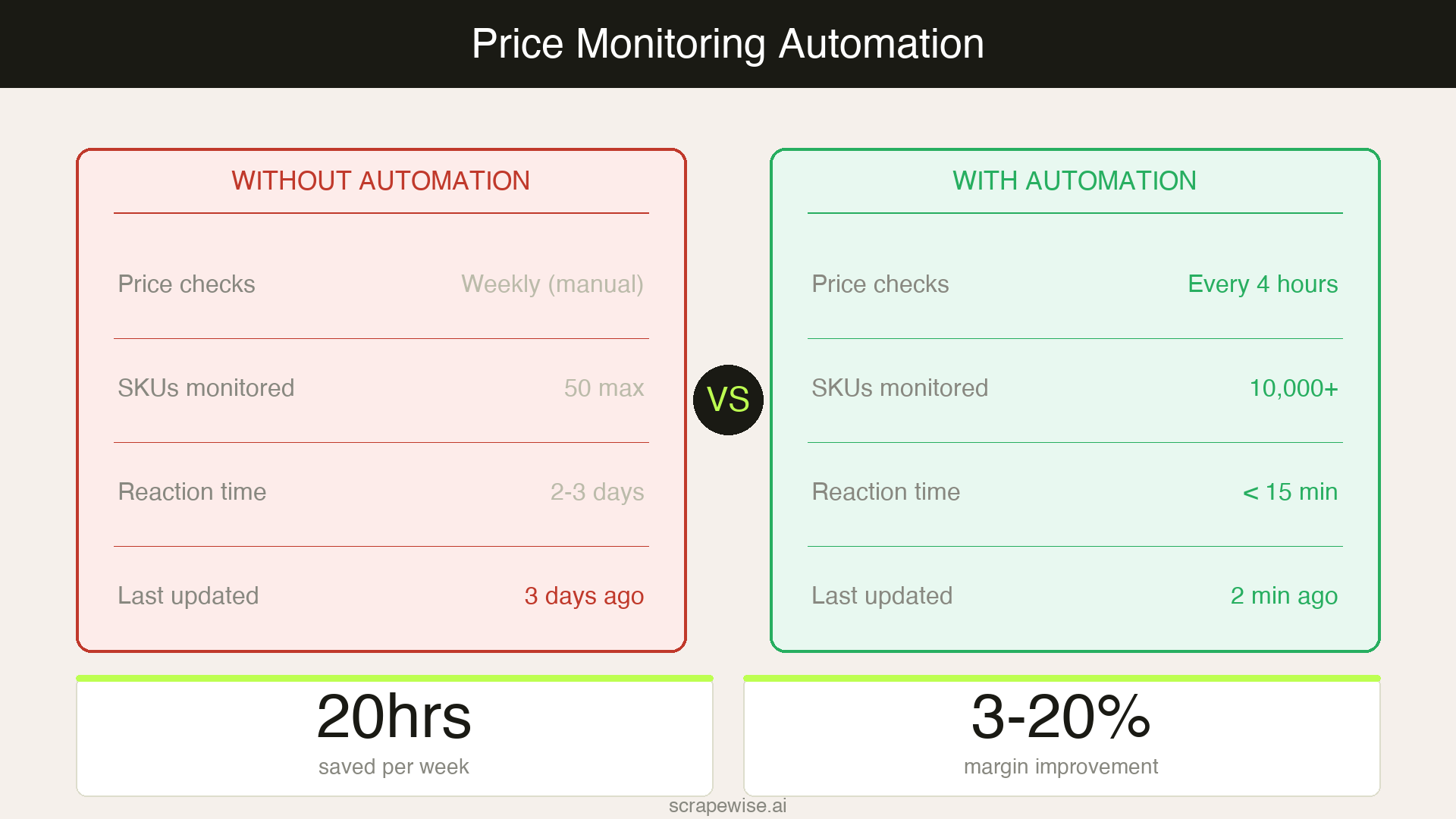
A mid-market retailer monitoring 1,000 SKUs across three competitor sites has 3,000 price points to check. Daily. Including promotions, bundle pricing, shipping add-ons, and out-of-stock flags. A pricing analyst doing this manually spends roughly 20 hours per week on data entry before doing any actual analysis.
The real cost isn't the hours — it's the latency. By the time you've updated your spreadsheet, your competitor has already run a 6-hour flash sale you missed entirely.
Modern e-commerce pricing moves in near-real time. Amazon reprices millions of SKUs multiple times per day. European marketplaces like Bol.com, Zalando, and Otto update promotional pricing hourly during campaign periods. If your price monitoring is a spreadsheet someone updates by hand, you're playing yesterday's game.
The solution is full price monitoring automation: scrapers that pull competitor prices on a schedule, normalize the data, and push it to wherever your pricing decisions happen.
The Two Approaches to Price Monitoring Automation
When retailers decide to automate, they typically face a binary choice. Understanding the trade-offs upfront saves months of frustration.
SaaS Price Monitoring Tools
Platforms like Prisync, Priceva, and Minderest offer fully managed price monitoring. You add competitor URLs, configure your products, and the tool does the rest.
The advantages: Fast setup, no engineering required, built-in dashboards and alerts.
The structural problem: Every serious SaaS price monitoring tool prices by SKU. At 10,000 SKUs across 5 competitors, you're looking at €2,000–€8,000 per month — and that's before you need custom data fields, higher refresh frequencies, or sites the tool doesn't natively support.
More critically, you don't own the data pipeline. The tool controls what it monitors, how often, and in what format. If you need price history going back 18 months, competitor stock levels, or promotional text alongside the price — many tools either don't support it or charge extra.
For enterprise retailers this is fine. For mid-market teams managing 500–15,000 SKUs with lean budgets, the economics break down fast. And for brands monitoring distributor and reseller pricing (not just direct competitors), coverage gaps are a constant frustration.
Scraper-Based Price Monitoring Automation
The alternative is configuring your own web scrapers to pull price data directly from competitor and retailer pages. This is what platforms like Scrapewise are built for: you define the URLs, the fields to extract, and the schedule — the infrastructure handles proxy rotation, JavaScript rendering, and request throttling.
The advantages: No per-SKU pricing. Monitor any URL on any site. Extract any data field — not just price, but stock status, promotional banners, seller information, review counts, and shipping costs. You own the output: a clean, structured dataset you can pipe anywhere.
The real investment: Configuration time upfront. You need to map CSS selectors for each site and maintain scrapers when layouts change. With a modern platform this is manageable, but it's not zero effort.
For teams monitoring 500+ SKUs with bespoke data requirements, the build-your-own approach pays back within weeks.
What to Extract Beyond the Price
Most retailers start with just the current price and immediately realize they're missing context.
A competitor's price means little without:
- Stock status — A competitor at €29 but showing "3 left in stock" is not a real threat to your margin. A competitor at €31 with ample inventory is.
- Promotional labels — "Flash sale ends in 4h" or "Members only: 20% off" changes the competitive calculus entirely.
- Shipping cost — Free shipping on a €35 product can undercut your €28 product with €7.99 shipping.
- Price scraped-at timestamp — Knowing exactly when the price was pulled tells you how stale the data is.
- Rating and review count — Products with 500+ reviews at a higher price often outcompete lower-priced alternatives. This is positioning data, not just price data.
Define all five fields from day one. The marginal effort of adding extra CSS selectors during initial setup is far smaller than retrofitting them six months later. Our guide on scraping JavaScript-heavy e-commerce sites covers handling modern storefronts that render prices via client-side JavaScript — a critical consideration for any site built on React, Vue, or Next.js.
How to Set Up Price Monitoring Automation with Scrapewise
Here's the practical setup process for a mid-market retailer.
Step 1: Map Your Monitoring Universe
Before touching any tooling, build a structured list of what you're monitoring:
| Column | Example |
|---|---|
| Your SKU | SW-LAPTOP-14 |
| Competitor | Competitor A |
| Competitor URL | https://competitora.com/laptops/model-14 |
| Marketplace | Amazon.de |
| Marketplace URL | https://amazon.de/dp/B08XYZ123 |
| Monitoring priority | High / Medium / Low |
For most mid-market retailers, this list has 500–5,000 rows. Structuring it cleanly means your scraper configuration maps directly to your product catalog.
Step 2: Configure One Scraper Per Site Type
You don't configure a separate scraper per URL. You configure one scraper per site type (e.g., one for Amazon.de, one for Competitor A's storefront) and add all relevant product URLs to that scraper's queue. The platform handles the rest.
For each scraper, define the CSS selectors for: price, stock status text, promotional badge, and shipping cost. Scrapewise's website-to-API capability means the output is immediately consumable by your downstream systems without any file exports.
Step 3: Set Your Refresh Schedule by Category
| Category | Recommended frequency | Reason |
|---|---|---|
| Consumer electronics | Daily, plus on-demand runs during launches | Flash sales, deal aggregators |
| Fashion / apparel | Daily | Slower repricing cycle |
| Grocery / FMCG | Daily | Promotions change daily |
| Industrial / B2B | Weekly | Slower-moving prices |
| Marketplace top SKUs | Daily, plus on-demand runs | Algorithmic repricing |
For most retailers, daily monitoring covers most SKUs. Add on-demand runs for your top-50 revenue drivers during promotions.
Step 4: Connect the Data Downstream
Raw scraped data sitting in a database helps no one. Define the output path early:
- BI dashboards (Looker Studio, Power BI, Tableau): Load the CSV export or REST API output into a SQL table your dashboard reads. Pricing managers see their competitive position without touching raw data.
- Repricing engines: Your repricing engine pulls scraper output through the REST API on a schedule. Typical pattern: scraper run → API pull → repricing rules → live price update.
- Threshold checks: Flag rows in your BI tool or repricer when a competitor price drops more than 5%, goes out of stock, or adds a promotional label.
Pitfalls That Derail Automation Projects
Most price monitoring automation projects don't fail due to bad tooling — they fail at the margins.
JavaScript-rendered prices. A growing share of e-commerce sites render prices via React or Vue after the initial HTML loads. A basic HTTP scraper returns blank or incorrect values. Your platform needs full JavaScript rendering. This is non-negotiable for most major European retailers in 2026 — Zalando, MediaMarkt, and Bol.com all render pricing dynamically.
Anti-bot measures. Over 60% of major e-commerce sites now deploy some form of bot detection, according to Bright Data's infrastructure research. Platforms that handle proxy rotation, browser fingerprinting, and request throttling save you from constant firefighting.
Selector drift. Sites redesign. When a competitor updates their product page layout, your CSS selector breaks silently — you keep "getting data" but the values are wrong. Build a validation layer that flags obviously incorrect values (price = €0, price > €9,999) before bad data reaches downstream systems.
Missing timestamps. Every scraped record must carry a scraped_at field. Without it, you cannot tell whether a €25.99 price is from this morning or last week. Stale data in a repricing engine causes active harm. Self-healing scraper infrastructure covers how to build validation and auto-recovery into your pipeline.
Calculating the ROI of Price Monitoring Automation
The business case is straightforward once you put numbers to it.
A pricing analyst spending 20 hours per week on manual price checks costs roughly €35,000–€55,000 per year in loaded labour. Automation eliminates that task almost entirely — reducing it to configuration and exception handling (2–3 hours per week).
The larger return comes from faster repricing. Research consistently shows retailers that automate repricing see margin improvements of 3–20%, depending on category competitiveness. For a retailer with €5M in annual revenue and 40% gross margin, even a 3% margin improvement generates €60,000 in incremental gross profit annually.
European retailers competing on Bol.com, Otto, and Amazon.de face constant price pressure during promotional periods — Black Friday, Singles' Day, end-of-season events. Automation is what lets lean pricing teams compete with larger players who have dedicated pricing departments.
| Factor | SaaS tool | Scraper-based (Scrapewise) |
|---|---|---|
| Monthly cost at 10K SKUs | €2,000–€8,000 | Flat rate, no per-SKU fee |
| Site coverage | Tool's supported list | Any publicly accessible URL |
| Custom fields | Limited, often extra cost | Any field you can selector-target |
| Data ownership | Vendor's database | Your database |
| Refresh frequency control | Often plan-capped | You set the schedule |
For a full breakdown of leading tools in this space, see our competitive price monitoring tools comparison.
Building Toward Pricing Intelligence
Price monitoring automation is the foundation, not the destination.
Once you have clean, timestamped competitor price data flowing automatically, you unlock a second layer: pricing intelligence.
- Historical trend analysis: Has this competitor been running a slow, rolling price decrease for six weeks? Are they testing a new price floor?
- Promotional pattern recognition: Which competitor consistently discounts the Friday before a bank holiday? Can you pre-empt that move?
- Assortment gap signals: Your competitor consistently shows stock on a SKU you're perpetually out of. That's a procurement signal, not just a pricing signal.
- Margin optimization at velocity: With cost data from your ERP and live competitor prices from your scraper, your pricing engine calculates the exact margin at any price point before you publish it.
For a worked example of reading promo cycles and price leaders from this data, see our guide on reading competitor pricing strategies from your tracking data.
This is the gap between retailers that use price monitoring defensively ("don't be more expensive than Competitor X") and those using it as a strategic weapon. The AI-native pricing strategies now deployed by leading European retailers are only possible when the underlying data layer is solid, automated, and owned.
Price monitoring automation isn't a technology problem. It's a data infrastructure decision. Build it right once — own your pipeline, your fields, your schedule — and your pricing team operates at a fundamentally different speed than competitors still updating spreadsheets at 9 a.m.
Paste a competitor URL — start tracking prices in 60 seconds
Any e-commerce site, any SKU count. Clean structured feeds on your schedule, no code required.
97% accuracy on Amazon benchmarks · no credit card · book a 15-min call →