
Idealo Scraper
We do not have a dedicated Idealo data API. What we do have is an AI scraper that reads an idealo page you point it at, turns it into columns, and runs on a schedule. You pay per page from your wallet.
- idealo.de
- idealo.at
- idealo.co.uk
- idealo.fr
- idealo.it
- idealo.es
How to scrape Idealo
Most people searching for an "idealo API" are looking for something that does not exist in the form they expect. Idealo's own programmatic access is merchant-facing — it is built for shops that list offers on the platform, not for buyers who want to read competitor prices off it. There is no public read API you can sign up for, and Scrapewise does not carry a dedicated Idealo endpoint either. What works instead: paste an idealo product URL into our AI scraper, define the columns you want it to return, and set a daily schedule. The AI fills those columns off the rendered page on every run. Data comes back by REST API, CSV or Excel. You pay per page from a prepaid wallet — no plan, no seat count.
What the AI scraper does with an idealo link
The same three steps as any other page you point it at. Nothing about idealo is pre-built, which is exactly why it works on pages a fixed integration would never cover.
Paste the link
Give it an idealo product page or an offer-list URL. Any country domain works the same way, because the scraper works from the URL you hand it rather than from a country-specific integration. You can paste one link or a whole list in the same run.
You declare the columns
A repricing job on idealo usually wants offer price, shipping, total, shop name and position in the offer list. You name those fields yourself in a Custom Schema, or start from the ready Product List schema and add to it. The AI then fills your fields from the page after JavaScript has run, rather than from a saved CSS selector, so an ordinary idealo redesign usually does not break the run.
Schedule it and take the data out
Run it once, or daily — the fastest schedule available, and the right cadence for a comparison site where offers move over hours, not seconds. Pull each run by REST API or download it as CSV or Excel. The columns stay the same between runs, so the output drops into a BI tool, a spreadsheet or your own repricing logic without a transformation step.
Set it up once. The data keeps coming.
Save your search once and it runs by itself. Every run lands in your own Scrapewise database, and you pick how to read it.
Set it up once
Add your ASINs, keywords, places or apps to a scraper in the web app. New accounts get 5 free requests.
Runs on your schedule
Pick daily, weekly on the days you choose, every few days, or the first or last day of the month. Scheduled runs start at night, European time. Need it more often? Start runs from your own code.
Saved in your database
Each run adds dated rows, so this week sits next to last week. Rows are kept for 90 days.
Use it your way
Open the table in the web app and download the latest run as an Excel file. Ask your own AI assistant about it. Or pull the rows into your code with an API key.
Ask your AI assistant about your own data
Connect Claude Desktop or Claude Code with a read-only key. The assistant reads the rows you've already collected, at no extra cost on Scrapewise. With a full-access key it can start a run for you too.
- Which of my ASINs lost the Buy Box this week?
- Which competitor cut prices the most since Monday?
- Show the keywords where I dropped out of the top 10.
What you send and what you get
You send a link and a column list. Country, currency and which merchants are on the page all come from the page itself, so there is nothing else to configure.
- Link to an idealo listing pagerequired
Open the category or offer list in your browser and copy the address. Any idealo country domain works the same way.
https://www.idealo.de/preisvergleich/ProductCategory/19116.html - Your column listrequired
Start from the ready Product List schema or name your own fields in a Custom Schema. The AI fills the fields you declared.
Custom Schema, 5 fields - How often it runsoptional
- On demand
- Daily
- Weekly
- Monthly
Daily is the fastest cadence available, and the right one for a comparison page where offers move over hours.
One row per product tile in the listing, 5 columns each
- list_position
- product_title
- best_price
- offer_count
- checked_at
REST API, CSV or Excel. The column set stays the same between runs, so downstream jobs do not re-map fields.
What a run on one idealo page actually returned
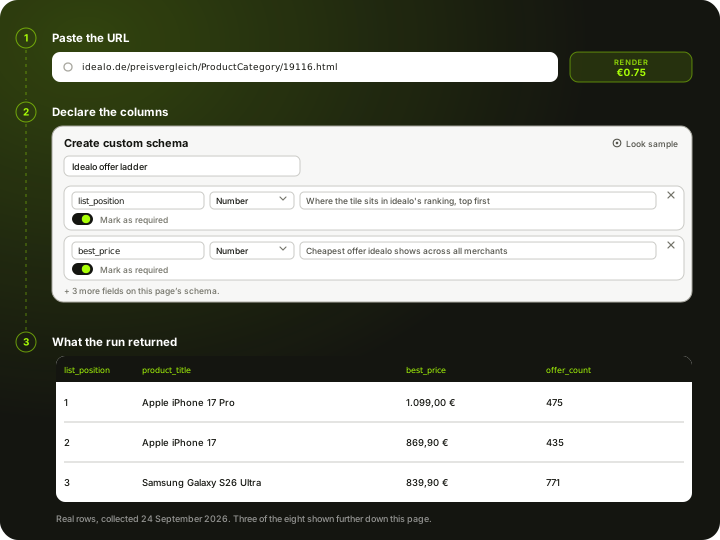
This is real output, not a mock-up. These are the first eight product tiles idealo.de returned on its smartphone category page on 24 September 2026, collected through a real browser because a plain fetch is refused. Scroll sideways to see every column.
All 5 columns
- list_position
- product_title
- best_price
- offer_count
- checked_at
list_positionlist_positionWhere the product sits in idealo's ranking, top first | product_titleproduct_titleProduct title as idealo writes it | best_pricebest_priceCheapest offer idealo shows across all its merchants | offer_countoffer_countHow many merchant offers the product carried on this run | checked_atchecked_atWhen this run collected the page (UTC) |
|---|---|---|---|---|
| 1 | Apple iPhone 17 Pro | 1.099,00 € | 475 | 2026-09-24T18:35:40Z |
| 2 | Apple iPhone 17 | 869,90 € | 435 | 2026-09-24T18:35:40Z |
| 3 | Samsung Galaxy S26 Ultra | 839,90 € | 771 | 2026-09-24T18:35:40Z |
| 4 | Apple iPhone 17 Pro Max | 1.200,00 € | 594 | 2026-09-24T18:35:40Z |
| 5 | Apple iPhone Air | 869,90 € | 483 | 2026-09-24T18:35:40Z |
| 6 | Xiaomi POCO F9 Ultra | 727,49 € | 30 | 2026-09-24T18:35:40Z |
| 7 | Google Pixel 10a | 389,00 € | 285 | 2026-09-24T18:35:40Z |
| 8 | Motorola Edge 70 Pro | 452,00 € | 94 | 2026-09-24T18:35:40Z |
What an idealo page costs
Pay-as-you-go from your wallet. No plan, no monthly fee, no seat count.
Measured on 24 September 2026, not assumed. A plain fetch of an idealo listing is refused outright, but the same URL loaded in a real browser came back in full, so a run needs a rendered page and nothing more expensive than that. The sample table above is that run.
500 idealo product pages checked once a day for a month is 15,000 pages.
about EUR 11.25 for the month at this tier
You are charged for the tier a run actually used, not the tier it was expected to need, and your balance never expires.
See the full price list →What this page is not promising
We would rather say this here than in a support ticket.
No dedicated idealo endpoint
There is no Idealo data API in our catalogue and no pre-built idealo schema. The AI scraper reads the page you point it at — that is the whole mechanism.
No guaranteed delivery
Idealo refuses plain requests at its edge, so runs go out rendered. That cleared the listing we sampled above, but we cannot promise every idealo page returns data on every run.
Daily, not real time
Daily is the fastest schedule. There is no real-time feed, no per-minute polling and no price-drop alerting.
No price-history database
We store nothing about idealo prices on our side. You get the history the page itself displays, on the day you scraped it.
No SKU matching included
You get the rows; mapping idealo offers to your own catalogue is yours to do. If you want that handled, it is a separate job from scraping.
No repricing or merchant tools
We do not push prices anywhere or connect to idealo's merchant side. And we are not lawyers — check idealo's terms and your own situation before you run anything.
Typical fields the AI scraper extracts from an idealo page
Treat this as a starting point rather than a fixed schema. What comes back is whatever the page actually shows on the day of the run.
Price and shipping
The figures a price-monitoring job is actually built on. Total price is what you compare on — a cheaper headline offer with dearer shipping loses.
- Offer price
- Shipping cost
- Total price including shipping
- Price history, when the page shows it
Who is selling it
Idealo is an offer list, not a single price. These columns tell you which merchant each row belongs to and how visible that offer is.
- Shop (merchant) name
- Shop rating
- Availability and delivery time
- Offer position in the list
- Payment methods accepted
Product identity
What you match your own catalogue against. On idealo this is mostly text, which is why matching is a separate job from scraping.
- Product name
- Category breadcrumb
- Number of offers on the page
- Product image URL
The column list is one you write: name each field, give it a type and a line telling the AI what to look for. The schema belongs to your account, so the field set you settle on for idealo can be reused on the next site you point us at. How Custom Schema works →
What it cannot give you If a field is not visible on the page, the scraper cannot invent it. Identifiers such as EAN or GTIN only come back when idealo prints them on the page you scraped — on many listings it does not, and no scraper can recover a number the page never rendered. The same applies to price history: you get the chart's values only when idealo displays the chart.
What people use idealo data for
Competitor price monitoring
Idealo aggregates dozens of merchants on one page, so a single scraped URL tells you what every competitor selling that product is charging today. Run it daily and you have a price curve per SKU without touching a single merchant site.
Total-price comparison, not sticker price
The lowest offer on idealo is frequently not the cheapest once shipping lands. Pulling price and shipping as separate columns lets you rank on delivered cost, which is the number the shopper actually compares.
Feeding your own repricing rules
The export is a normal REST API or CSV, so it drops into whatever repricing logic you already run. Scrapewise supplies the observation; your rules decide what to do with it.
Watching where you rank in the offer list
Position in the offer list drives clicks more than the price gap does. Scraping your own position alongside the prices above you shows how much of a cut it would actually take to move up.
Finding out who is selling your product
For brands, the offer list is a roster of every merchant carrying your SKU on the platform — including the ones you never authorised. That feeds straight into brand and MAP work.
Cross-border price checks in the DACH region
Idealo runs separate country domains, and the same product often sits at a different price on .de than on .at. Scraping both into one table exposes the arbitrage — and the pricing inconsistency your own channel may be creating.
What makes idealo harder than an ordinary storefront
Idealo is one of the harder sources on the web. Here is what the scraper is actually up against.
Bot protection
- Plain HTTP requests are refused at the edge — a naive fetch returns a challenge, not a page
- Pages have to be rendered in a real browser, which is why they cost more per page than a plain fetch
- Success is high but not guaranteed; a page that refuses on one run may come back on the next
Page structure
- Offers load after JavaScript, so the raw HTML source is missing most of what you want
- The offer list is paginated or lazily expanded — the visible top offers are not the full list
- Layout changes periodically, which breaks selector-based scrapers but not an AI that re-reads the page
Country domains
- idealo.de, .at, .co.uk, .fr, .it and .es are separate sites with separate offer sets
- The same product carries different IDs per domain, so cross-country comparison needs matching on your side
- Currency and shipping conventions differ per domain and must be normalised before you compare
Scheduling and delivery
- Daily is the fastest cadence; on-demand runs are available for spot checks
- Every run is retrievable by REST API, or downloadable as CSV or Excel
- Columns stay stable between runs, so downstream jobs do not need to re-map fields
Idealo scraping — questions
What people ask before pointing the scraper at idealo.
Not one you can sign up for as a data buyer. Idealo's programmatic access is aimed at merchants who list on it, not at people who want to read its prices. That is why 'idealo api' is such a common search. Scrapewise does not have a dedicated Idealo data API either — you use the AI scraper on idealo pages instead.
Ready to pull Idealo data into your stack?
Start free — or talk to our team about your exact fields, refresh cadence and volume.