
eBay Scraper
eBay does publish an API, and for live listings it is often the right tool. What it will not give you is sold and completed history, which is the number most pricing and reselling work is actually built on. That comes off the page, and that is what the AI scraper does.
- ebay.com
- ebay.co.uk
- ebay.de
- ebay.fr
- ebay.it
- ebay.es
- ebay.com.au
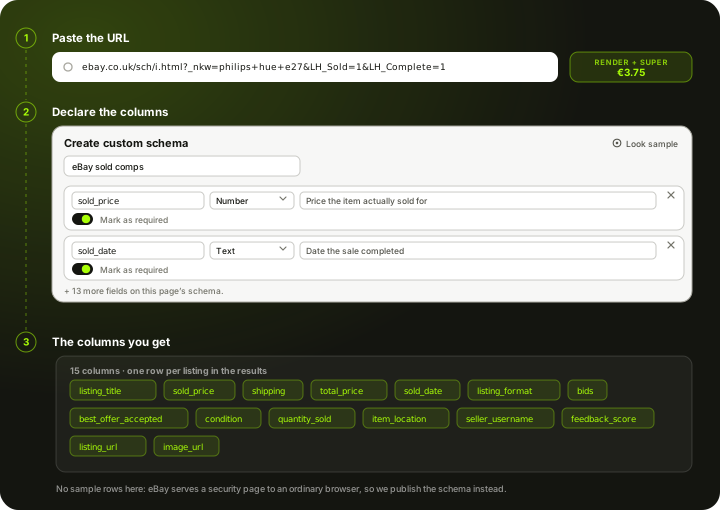
How to scrape eBay
eBay is a rare case among the sites on this hub: it has a genuine public API. The Browse API returns live, active listings, and if that is all you need it is worth using before you scrape anything. The gap opens at sold and completed items. eBay keeps that history out of its buyer-facing API, and the Marketplace Insights API that does expose it is a restricted, application-only programme most teams never get into. So "ebay sold listings scraper" is not a lazy search term, it is people running into a real wall. The workaround is the page itself: eBay renders sold and completed results to any visitor in the browser. You paste those search URLs into the AI scraper, declare the columns you want, and set a schedule. Every run comes back over REST, CSV or Excel, and you pay per page from a prepaid wallet.
What the AI scraper does with an eBay link
Three steps, same as any other site. The eBay-specific part is which URL you hand it, because that decides whether you get live listings or sold history.
Paste the link
A single listing, a seller's shop page, or a search results URL with the filters already applied. That last one matters on eBay: the sold and completed filter is part of the URL, so a search you built by hand in the browser is a valid input. Any country domain works the same way, because the scraper reads the URL rather than a per-market integration.
You declare the columns
A reselling or pricing job on eBay usually wants title, sold price, shipping, condition, sold date, seller name, feedback score and whether the listing was auction or Buy It Now. You name those fields yourself in a Custom Schema, or start from the ready Product List schema and add to it. The AI then fills your fields from the page after JavaScript has run, so a layout change does not break the run the way a saved CSS selector would.
Schedule it and take the data out
Sold results roll off eBay's public view after a limited window, so the value of scraping on a schedule is cumulative: each daily run captures the slice that was visible that day, and the table you build up goes back further than any single scrape could. Pull each run by REST, CSV or Excel with a stable column set.
Set it up once. The data keeps coming.
Save your search once and it runs by itself. Every run lands in your own Scrapewise database, and you pick how to read it.
Set it up once
Add your ASINs, keywords, places or apps to a scraper in the web app. New accounts get 5 free requests.
Runs on your schedule
Pick daily, weekly on the days you choose, every few days, or the first or last day of the month. Scheduled runs start at night, European time. Need it more often? Start runs from your own code.
Saved in your database
Each run adds dated rows, so this week sits next to last week. Rows are kept for 90 days.
Use it your way
Open the table in the web app and download the latest run as an Excel file. Ask your own AI assistant about it. Or pull the rows into your code with an API key.
Ask your AI assistant about your own data
Connect Claude Desktop or Claude Code with a read-only key. The assistant reads the rows you've already collected, at no extra cost on Scrapewise. With a full-access key it can start a run for you too.
- Which of my ASINs lost the Buy Box this week?
- Which competitor cut prices the most since Monday?
- Show the keywords where I dropped out of the top 10.
What you send and what you get
You send a link and a column list. On eBay the link does most of the work: the sold and completed filter lives in the URL, so a search you built by hand in the browser is a valid input.
- Link to an eBay search, shop or listing pagerequired
Apply the filters in your browser first, then copy the address. Any eBay country domain works the same way.
https://www.ebay.co.uk/sch/i.html?_nkw=nintendo+switch+oled&LH_Sold=1&LH_Complete=1 - Your column listrequired
Start from the ready Product List schema or name your own fields in a Custom Schema. The AI fills the fields you declared.
Custom Schema, 15 fields - How often it runsoptional
- On demand
- Daily
- Weekly
- Monthly
Sold results roll off eBay's public view, so a daily run builds a history that reaches further back than any single scrape.
One row per listing in the results, 15 columns each
- listing_title
- sold_price
- shipping
- total_price
- sold_date
- listing_format
- bids
- best_offer_accepted
- condition
- quantity_sold
- item_location
- seller_username
- +3 more, see all columns
REST API, CSV or Excel. The column set stays the same between runs, so downstream jobs do not re-map fields.
The columns an eBay run gives you
We are not going to print a table of invented sold listings and call it real output. eBay refuses both a plain fetch and an ordinary browser, so a run has to go through the residential tier. This is the column list you declare before the run, and the column list every run comes back with.
listing_titleTitle as the seller wrote itsold_priceWhat the item actually cleared atshippingPostage as the listing stated ittotal_priceSold price plus postagesold_dateDate eBay shows the sale closedlisting_formatAuction or Buy It NowbidsNumber of bids, on auction listings onlybest_offer_acceptedWhether the listing closed on an accepted offerconditionCondition wording on the listingquantity_soldUnits this listing moveditem_locationWhere the seller dispatches fromseller_usernameSeller handlefeedback_scoreSeller feedback score shown with the listinglisting_urlLink back to the listingimage_urlMain listing image linkThe columns are yours, not ours. Add, rename or drop any of them in a Custom Schema and every future run returns exactly your set.
What an eBay page costs
Pay-as-you-go from your wallet. No plan, no monthly fee, no seat count.
Measured on 24 September 2026, not assumed. A plain fetch of an eBay sold-results URL is refused, and loading the same URL in a real browser returned eBay's security-measure page rather than the results. A browser alone is not enough here, so budget for a rendered page coming out of a residential exit.
200 sold-results pages checked once a day for a month is 6,000 pages.
about EUR 22.50 for the month at this tier
You are charged for the tier a run actually used, not the tier it was expected to need, and your balance never expires.
See the full price list →What this page is not promising
We would rather say this here than in a support ticket.
No dedicated eBay endpoint
There is no eBay data API in our catalogue and no pre-built eBay schema. The AI scraper reads the page you point it at. If eBay's own Browse API covers your case, use it.
No sold history beyond the public view
We can only read what eBay still shows. Sales that have already aged out of the public sold view are gone, and we hold no archive of our own to backfill them from.
No buyer data
Buyer identities are not published on the page, so they are not in the output. Nothing here returns personal data about purchasers.
Daily, not real time
Daily is the fastest schedule. There is no live auction feed, no per-minute bid polling and no snipe or bidding function.
No SKU matching included
You get eBay's rows as eBay presents them, and eBay titles are free text written by sellers. Tying a listing to the right product in your catalogue is a separate job from scraping.
No selling or repricing tools
We do not list, bid, relist or push prices to eBay, and we do not connect to eBay's seller tools. And we are not lawyers, so check eBay's terms and your own situation before you run anything.
Typical fields the AI scraper extracts from an eBay page
A starting point, not a fixed schema. What comes back is whatever that listing or results page actually shows on the day of the run.
Price and sale
On a sold results page this is the point of the exercise: what the item actually cleared at, not what somebody hoped to get.
- Sold or asking price
- Shipping cost
- Total delivered price
- Sold date
- Auction or Buy It Now
- Number of bids, on auction listings
- Best Offer accepted flag, when shown
Listing and condition
Condition is the variable that makes eBay comparisons go wrong. Two identical titles at very different prices are usually New versus Used, not a pricing error.
- Listing title
- Item condition
- Quantity sold and quantity available
- Item location and dispatch country
- Item specifics shown on the listing
- Listing image URL
Who is selling it
For brand and MAP work this is the column set that matters more than price. An eBay search is a roster of everyone moving your SKU.
- Seller username
- Feedback score and positive percentage
- Top Rated Seller badge
- Shop name, on shop listings
- Returns policy shown on the listing
The column list is one you write: name each field, give it a type and a line telling the AI what to look for. The schema belongs to your account, so an eBay field set can be pointed at the next marketplace without rebuilding it. How Custom Schema works →
What it cannot give you The scraper reads what eBay renders and nothing more. Sold results are only available for as long as eBay keeps showing them publicly, so a scrape today cannot recover a sale that has already dropped out of the public view, and there is no historical archive on our side to fall back on. Buyer identities are not published on the page and are not something we can return. Item specifics vary listing by listing, so a field that exists on one row may simply be absent on the next.
What people use eBay data for
Real sold prices, not asking prices
An active listing tells you what a seller wants. A sold listing tells you what a buyer paid. Building a table of sold prices per SKU over weeks gives you a clearing price you can actually price against, which is the single most common reason people scrape eBay at all.
Resale and arbitrage sourcing
Sold price minus eBay's cut, minus shipping, against what the item costs you today. Run that across a category on a schedule and the margin candidates surface without anyone browsing eBay by hand.
Finding unauthorised sellers of your brand
For brands, an eBay search on your product name is a list of everybody moving your SKU, including the grey-market sellers you never appointed. Seller name, feedback and price together are what a MAP or channel case gets built on.
Tracking your own competitors' listings
If you sell on eBay, the sellers above you in search are the ones taking your volume. Scraping their price, shipping, condition and position tells you whether you are losing on price or on placement, which need very different responses.
Demand signal by category
Quantity sold and sold dates across a category are a cheap read on what is actually moving, and how fast. It is not a market research panel, but it is observed transactions rather than survey intent.
Valuing used and end-of-life stock
For anything discontinued, refurbished or second hand, eBay is often the only public market with real clearing prices. That makes it the reference point for writing down stock or pricing a trade-in programme.
What makes eBay awkward to scrape
Less hostile than a price comparison site, but the data model catches people out more often than the bot wall does.
The sold-data gap
- The public Browse API covers live listings only, so an active-listing job may not need scraping at all
- Sold and completed history sits behind Marketplace Insights, a restricted programme rather than a signup
- The public sold view is time-limited, so history has to be accumulated run by run rather than pulled in one go
Page structure
- Search results render after JavaScript, so the raw HTML source is missing most of the rows
- Results are paginated and eBay caps how deep a single search will page, so a broad query has to be split into narrower ones
- Promoted listings are interleaved with organic results and look identical unless you capture the flag
- Item specifics are free text per listing, so the same attribute appears under different labels
Country sites
- ebay.com, .co.uk, .de, .fr, .it, .es and .com.au are separate marketplaces with separate inventory
- The same item carries a different item number per site, so cross-market comparison needs matching on your side
- Currency, VAT treatment and shipping conventions differ per site and must be normalised before you compare
Scheduling and delivery
- Daily is the fastest cadence, which suits sold data because it only updates as sales complete
- Every run is retrievable by REST API, or downloadable as CSV or Excel
- Columns stay stable between runs, so a growing sold-price table needs no re-mapping
eBay scraping — questions
What people ask before pointing the scraper at eBay.
eBay has a real public API, and for live, active listings it is usually the better option: it is free at normal volumes, it is supported, and it gives you clean structured data. Reach for a scraper when the API does not cover what you need, which in practice almost always means sold and completed listings, or fields that only appear in the rendered page.
Ready to pull eBay data into your stack?
Start free — or talk to our team about your exact fields, refresh cadence and volume.