

Web scraping is the automated extraction of data from websites. Instead of manually copying information from web pages into spreadsheets, software reads the underlying structure of a page and pulls out specific data points — product prices, property listings, job postings, contact details — and delivers them in a structured format like CSV, JSON, or a database. It is the most widely used method for collecting publicly available web data at scale.
The practice has moved well beyond developer experiments. According to Market.us, the global web scraping market reached $754 million in 2024 and is growing at a 14.2% CAGR, on track to surpass $2 billion by 2030. Nearly 58% of organizations worldwide now actively use web scraping for business intelligence, pricing analysis, and competitive benchmarking.
This guide explains how web scraping works, where businesses use it, the legal framework around it, and how to decide between no-code platforms and code-based approaches.
How Does Web Scraping Work?
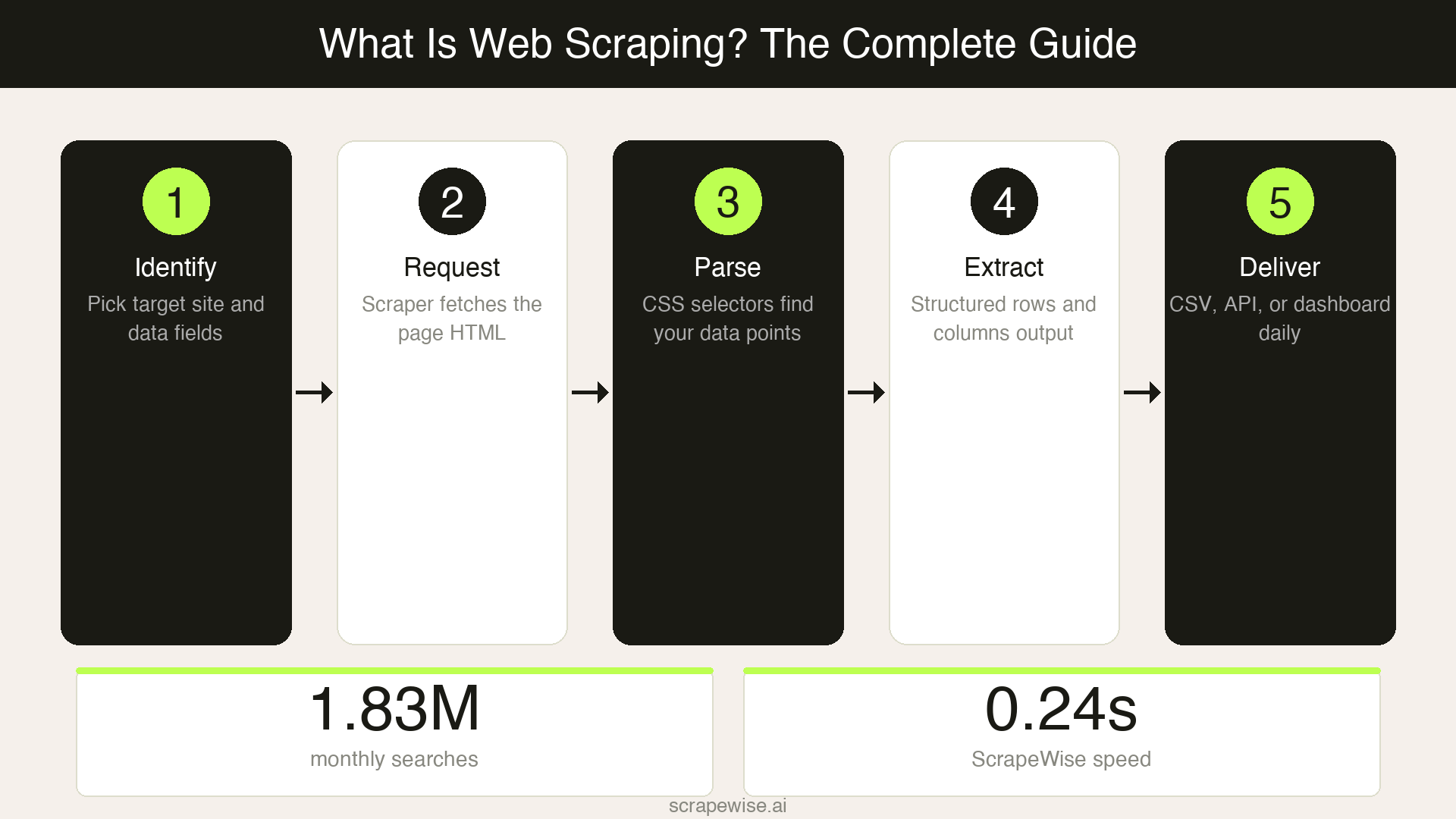
Web scraping follows a predictable sequence, whether you are writing Python scripts or using a visual point-and-click tool. Every scraping operation moves through the same five steps.
Identify the target. You decide which website and which data points you need — product names, prices, stock levels, review counts, or any other visible information on the page.
Send a request. The scraper sends an HTTP request to the target URL, the same type of request your browser makes when you visit a page. The web server responds with the page's HTML content.
Parse the HTML. The scraper reads the page structure (the HTML document object model) and locates the specific elements that contain your data. This is done using CSS selectors, XPath expressions, or — in newer tools — visual selection where you click on the data you want.
Extract and structure. The scraper pulls the identified data out of the HTML and organises it into rows and columns. One product becomes one row. Each data point (price, title, availability) becomes a column.
Store and deliver. The structured data is saved to a spreadsheet, database, or API endpoint. Most tools support scheduling, so this entire cycle repeats automatically — every hour, every day, or on whatever cadence you set.
The technical complexity varies enormously depending on the target website. A simple product listing page with static HTML can be scraped in minutes. A JavaScript-heavy single-page application with anti-bot protection requires headless browsers, proxy rotation, and more sophisticated handling.
Web Scraping vs APIs vs Manual Data Collection
Business teams collecting competitive data typically choose between three approaches. Each has clear trade-offs in speed, cost, and flexibility.
| Factor | Web Scraping | APIs | Manual Collection |
|---|---|---|---|
| Data access | Any publicly visible website | Only sites that offer an API | Any website, but one page at a time |
| Setup time | Minutes to hours | Hours to days (developer needed) | Immediate but ongoing |
| Scalability | Thousands of pages per run | Depends on API rate limits | 10-20 sites maximum per person |
| Data freshness | Scheduled — hourly, daily, weekly | Real-time if available | Always 24-48 hours behind |
| Cost at scale | Subscription or infrastructure cost | API fees (often per-request) | Staff time: 10-20 hrs/week |
| Technical skill | None (no-code tools) to advanced (custom code) | Developer required | None |
| Maintenance | Low (managed tools) to high (custom scripts) | Moderate (API changes) | High (repetitive manual work) |
| Legal clarity | Clear for public data (see legal section below) | Governed by API terms of service | No legal concerns |
When to use web scraping: You need data from websites that don't offer an API, or you need to monitor competitors who will never give you structured access to their pricing.
When to use an API: The data source provides a documented API with the fields you need. APIs are more reliable but less flexible — you can only access what the API exposes. For a hands-on look at this trade-off in Python, including working code for both approaches, see our guide to the YouTube scraper API vs the official Data API.
When manual collection still works: You track fewer than 10 competitors and need data weekly or less. Beyond that threshold, manual checking becomes a full-time job that still falls behind.
Common Use Cases for Web Scraping
Price Monitoring and Competitive Intelligence
The largest commercial application of web scraping is competitor price tracking. According to Datadwip research, 81% of US retailers now use automated price scraping for dynamic repricing — up from 34% in 2020. Amazon alone changes prices an estimated 2.5 million times per day, making manual monitoring impossible for any retailer competing on price.
Typical data extracted: competitor prices, shipping costs, stock availability, promotional discounts, and MAP (minimum advertised price) compliance.
Product Catalog and Market Research
E-commerce businesses, distributors, and market research firms scrape product catalogs to understand competitive assortments, identify new product launches, and track category trends. This includes product specifications, images, category taxonomies, and customer review data.
A category manager tracking 500 SKUs across 15 competitor sites would need to check 7,500 product pages manually. With web scraping, the same data arrives in a spreadsheet every morning before the workday starts.
Real Estate and Property Data
Real estate firms, investment funds, and PropTech companies scrape property listings to monitor pricing trends, identify investment opportunities, and build market models. Scraped data typically includes listing prices, square footage, location details, days on market, and historical price changes across platforms like Zillow, Rightmove, or regional MLS sites.
Lead Generation and B2B Sales Intelligence
Sales teams scrape publicly available business directories, industry association listings, and company websites to build prospect lists. Extracted data includes company names, contact information published on websites, industry classifications, company size indicators, and technology stack information.
Travel and Hospitality Rate Monitoring
Hotels, airlines, and online travel agencies scrape competitor rates to optimise their own dynamic pricing. A hotel revenue manager might track room rates across Booking.com, Expedia, and direct competitor websites to adjust pricing in real time based on market conditions.
Financial and Alternative Data
Investment firms, hedge funds, and fintech companies scrape web data as alternative data sources — job posting volumes as economic indicators, product review sentiment for earnings predictions, or supply chain data from shipping trackers.
Is Web Scraping Legal?
Web scraping of publicly available data is generally legal in the United States and the European Union, but the legal landscape has nuances every business should understand.
The key US precedent is hiQ Labs v. LinkedIn (Ninth Circuit, 2022). The court ruled that scraping publicly accessible data likely does not violate the Computer Fraud and Abuse Act (CFAA). The US Supreme Court's 2021 decision in Van Buren v. United States further narrowed the CFAA, holding that accessing publicly available information is not "unauthorised access" under the statute.
In the EU, the GDPR applies when scraped data includes personal information. Scraping product prices, property listings, or business data that does not contain personal data is generally permissible. When personal data is involved (names, email addresses), you need a lawful basis for processing — typically legitimate interest — and must comply with data minimisation principles.
Practical Legal Guidelines for Business Teams
- Public data is fair game. Scraping information that anyone can see in a browser — prices, product specs, business listings — is the least legally risky form of data collection.
- Respect robots.txt. This file tells automated tools which parts of a site the owner prefers not to be crawled. Honouring it demonstrates good faith, though it is not legally binding in most jurisdictions.
- Do not circumvent access controls. Scraping data behind a login, paywall, or CAPTCHA that you bypass raises serious legal risk. Stick to publicly accessible pages.
- Avoid excessive load. Sending thousands of requests per second can disrupt a website's operations. Use reasonable request rates and delays. Responsible scrapers behave like a polite visitor, not a denial-of-service attack.
- Check Terms of Service. Some websites explicitly prohibit scraping in their ToS. While ToS enforceability varies by jurisdiction, violating them can expose you to breach-of-contract claims.
- Do not scrape personal data without a lawful basis. Under GDPR, scraping names, emails, or other personal identifiers from websites requires compliance with data protection regulations.
This is not legal advice. Consult a lawyer for your specific use case, especially if you operate across multiple jurisdictions or handle personal data.
If you operate in Europe, our dedicated guide covers this in more depth: is price scraping legal in the EU?, including the Database Directive, court cases from Germany and the Nordics, and a 7-step compliance checklist.
No-Code vs Code-Based Web Scraping
The choice between no-code and code-based approaches depends on who is operating the scraper, how many sites you need to cover, and how much ongoing maintenance you can absorb.
| Factor | No-Code Platforms | Code-Based (Python, Node.js) |
|---|---|---|
| Who operates it | Business analysts, marketing teams, ops staff | Developers, data engineers |
| Setup time | Minutes — visual point-and-click | Hours to days per site |
| Learning curve | Low — no programming required | High — requires Python/JS + HTML knowledge |
| Flexibility | High for standard sites; limited for edge cases | Unlimited — full programmatic control |
| Maintenance | Handled by the platform | You fix it when sites change (expect monthly) |
| Anti-bot handling | Built-in proxy rotation, browser rendering | You build it: proxies, CAPTCHA solving, retries |
| Cost structure | Monthly subscription ($49–$500/mo) | Developer time ($80–$150/hr) + infrastructure |
| Best for | Business teams, repeating data collection tasks | One-off projects, highly custom requirements |
The Hidden Cost of Code-Based Scraping
The initial build cost of a custom scraper is just the beginning. Websites change their HTML structure regularly — new product page layouts, updated class names, reorganised navigation. Each change breaks your scraper and requires a developer to diagnose and fix it.
At a loaded developer cost of $80-150 per hour, maintaining custom scrapers across 20-30 competitor sites typically runs $10,000-20,000 per year in developer time alone. That figure does not include the opportunity cost — every hour spent fixing a broken scraper is an hour not spent on product development.
No-code platforms absorb this maintenance burden. When a target site changes its layout, the platform handles the adaptation. Your team's job is to define what data to collect, not how to collect it.
When Code-Based Scraping Still Makes Sense
Custom code is the right choice when you need to scrape behind authenticated sessions (with proper authorisation), process extremely high volumes (millions of pages daily), or integrate scraping into a larger data pipeline with custom transformation logic. If you have a dedicated data engineering team and the scraping is core to your product, owning the code gives you full control.
How to Choose a Web Scraping Tool
Choosing the right tool depends on three questions. Answer them in order — the first determines the category, the second narrows the options, and the third confirms the fit.
Question 1: Does your team have developers who will maintain scrapers?
- Yes, and they have bandwidth — Code-based tools (Scrapy, Puppeteer, Playwright) or developer APIs (ScraperAPI, ZenRows, Apify) give you maximum control.
- Yes, but they are busy with product work — A no-code platform removes the maintenance burden from engineering.
- No — A no-code platform is the only viable path. Do not hire a developer solely to maintain scrapers.
Question 2: How many sites do you need to scrape, and how often?
- 1-5 sites, weekly — Almost any tool works, including free tiers.
- 10-50 sites, daily — You need reliable scheduling, proxy management, and structured data export. This is where no-code platforms earn their subscription cost.
- 100+ sites, hourly — You need infrastructure-grade tooling — either an enterprise platform or a dedicated engineering team with proxy infrastructure.
Question 3: What do you do with the data after it is collected?
- Export to spreadsheets — Most tools handle this. Look for CSV/Excel export and Google Sheets integration.
- Feed into a BI tool or pricing engine — You need API output, webhook delivery, or direct database integration.
- Enrich and cross-reference across sources — Look for platforms that match products across different competitor sites by title, EAN, or other identifiers. Raw scraped data from five different sites is five disconnected spreadsheets. Enriched data is a single competitive pricing database.
Platforms like ScrapeWise combine the scraping, enrichment, and analysis layers so that business teams can go from "I need competitor prices" to "I have a live competitive pricing dashboard" without stitching together three separate tools. But no single platform is right for every use case — match the tool to your team's technical capacity and data workflow.
Frequently Asked Questions
What is web scraping in simple terms?
Web scraping is software that automatically reads websites and extracts specific data — like product prices, listings, or contact information — into a structured format such as a spreadsheet or database. It replaces the manual process of visiting websites and copying data by hand.
Is web scraping legal?
Scraping publicly available data is generally legal in the US and EU. The landmark hiQ v. LinkedIn case (2022) established that accessing public web data does not violate the Computer Fraud and Abuse Act. However, scraping personal data triggers GDPR obligations in Europe, and bypassing access controls (logins, CAPTCHAs) raises legal risk. Always consult legal counsel for your specific situation.
How is web scraping different from web crawling?
Web crawling discovers and indexes pages across the internet — search engines like Google crawl the web to build their search index. Web scraping extracts specific data from known pages. Crawling answers "what pages exist?" while scraping answers "what data is on this page?"
Do I need to know how to code to scrape websites?
No. No-code web scraping platforms let business teams set up scrapers using visual point-and-click interfaces. You select the data you want on a web page, configure the schedule, and the platform handles the technical execution. Code-based scraping (Python, Node.js) offers more flexibility but requires programming skills and ongoing maintenance.
What data can be scraped from websites?
Any information visible when you visit a website in a browser can be scraped: product names, prices, descriptions, images, reviews, business listings, property details, job postings, news articles, financial data, and more. Data behind logins or paywalls requires authorised access and carries additional legal considerations.
How much does web scraping cost?
The cost ranges widely. Free tools and browser extensions handle small projects. No-code platforms typically cost $49-$500 per month for business use. Code-based approaches cost developer time ($80-$150/hour) plus infrastructure (proxies, servers). Enterprise-grade solutions from providers like Bright Data or Zyte start at $500-$1,000 per month. The true cost of custom scraping includes ongoing maintenance — typically $10,000-$20,000 per year for 20-30 target sites.
How often should I scrape competitor websites?
It depends on how fast your market moves. Daily scraping is the standard for e-commerce price monitoring. Hourly scraping suits fast-moving categories (electronics, travel). Weekly scraping works for product catalog tracking, market research, and industries where prices change slowly. Start with daily and adjust based on how often you see meaningful changes.
What is the best web scraping tool in 2026?
There is no single best tool — the right choice depends on your technical capacity and use case. For business teams without developers, no-code platforms like ScrapeWise, Octoparse, or Browse AI provide visual setup and managed infrastructure. For engineering teams, frameworks like Scrapy (Python) or Playwright offer full programmatic control. For enterprise-scale needs, Bright Data and Zyte provide proxy infrastructure and managed data feeds.
Can websites block web scraping?
Yes. Websites use anti-bot measures including CAPTCHAs, IP rate limiting, JavaScript challenges, and browser fingerprinting to detect and block automated access. Professional scraping tools counter these with proxy rotation, headless browser rendering, and request throttling. The arms race between scrapers and anti-bot systems is ongoing — which is why managed platforms that handle this automatically are increasingly preferred over maintaining custom solutions.
What is the difference between structured and unstructured scraped data?
Raw scraped HTML is unstructured — a mess of tags, styles, and content mixed together. The scraping process converts this into structured data: clean rows and columns where each record is a product, listing, or entity, and each column is a specific attribute. The quality of this structuring determines whether your scraped data is actually useful for analysis or just noise in a spreadsheet.
Getting Started
Web scraping has matured from a developer-only technical exercise into an operational business tool. The market's growth to over $750 million reflects a simple reality: businesses that collect competitive data automatically make faster, better-informed decisions than those still relying on manual research.
If you are new to web scraping, start small. Pick one competitor and one data point — their product prices on a specific category page. Set up a scraper using a no-code tool, schedule it to run daily, and observe the data for two weeks. You will learn more from that single experiment than from any amount of reading.
The gap between companies that use structured web data and those that do not will only widen. The tools are accessible, the legal framework is increasingly clear, and the business case writes itself the first time you catch a competitor's price change 24 hours before your team would have noticed it manually.
Related reading: what automated web scraping is and how scheduled scrapers work, and how a website to API converter turns a product page into a data feed.
Paste any URL — ScrapeWise handles the anti-bot
Managed infrastructure that adapts when sites change. No proxies, no code, no per-request fees.
Not ready to sign up? See 12 real Amazon rows, 972 columns →
97% accuracy on Amazon benchmarks · no credit card · book a 15-min call →